# Gogh
**Repository Path**: trusted-list/Gogh
## Basic Information
- **Project Name**: Gogh
- **Description**: Gogh is a collection of color schemes for various terminal emulators, including Gnome Terminal, Pantheon Terminal, Tilix, and XFCE4 Terminal also compatible with iTerm on macOS.
- **Primary Language**: Unknown
- **License**: MIT
- **Default Branch**: master
- **Homepage**: https://gogh-co.github.io/Gogh/
- **GVP Project**: No
## Statistics
- **Stars**: 0
- **Forks**: 0
- **Created**: 2026-03-18
- **Last Updated**: 2026-03-19
## Categories & Tags
**Categories**: Uncategorized
**Tags**: None
## README
Gogh
## Color Scheme Implementer for Terminals
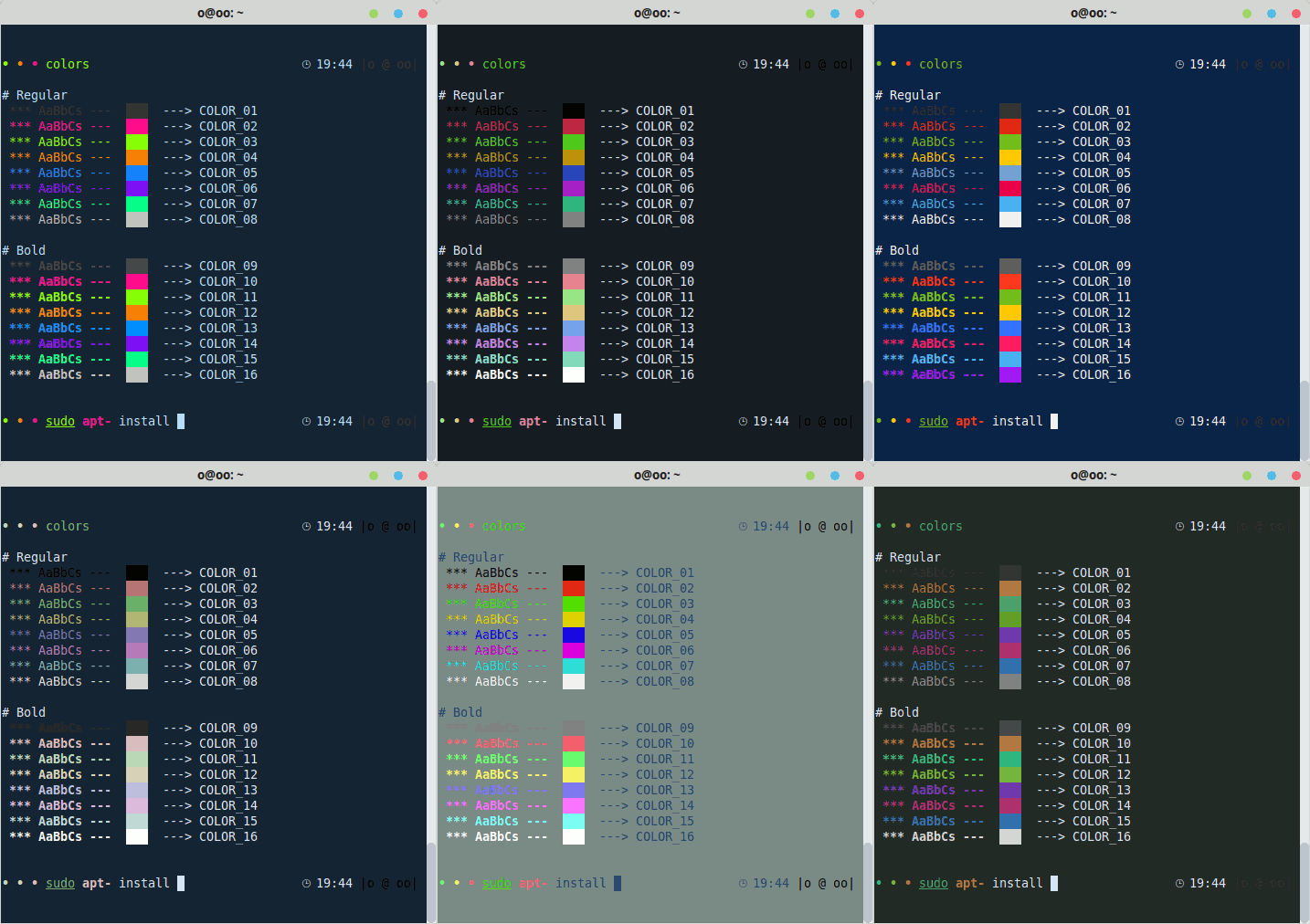
Gogh is a collection of color schemes for various terminal emulators, including Gnome Terminal, Pantheon Terminal, Tilix, and XFCE4 Terminal. These schemes are designed to make your terminal more visually appealing and improve your productivity by providing a better contrast and color differentiation. (This fork of Gogh includes a color scheme named "Vaombe".)
The inspiration for Gogh came from the clean and minimalistic design of Elementary OS, but the project has since grown to include a variety of unique and beautiful options. Not only does Gogh work on Linux systems, but it's also compatible with iTerm on macOS, providing a consistent and visually appealing experience across platforms.
This project is here for anyone to use, no expectations.
If you want to buy me a coffee voluntarily, you can use this link.
[](https://paypal.me/mgldvd?country.x=CO&locale.x=es_XC)
![]() Index:
Index:
- [Pre-Install](https://github.com/Gogh-Co/Gogh?tab=readme-ov-file#%EF%B8%8F-pre-install)
- **[Install](https://github.com/Gogh-Co/Gogh?tab=readme-ov-file#-install)**
- [Install (Non-Interactive mode)](https://github.com/Gogh-Co/Gogh?tab=readme-ov-file#%EF%B8%8F-install-non-interactive-mode)
- [Terminal Support](https://github.com/Gogh-Co/Gogh?tab=readme-ov-file#-terminals)
- [Available Themes](https://github.com/Gogh-Co/Gogh?tab=readme-ov-file#-themes)
- [Help](https://github.com/Gogh-Co/Gogh?tab=readme-ov-file#-help)
- [Create your Own Theme!](https://github.com/Gogh-Co/Gogh?tab=readme-ov-file#%EF%B8%8F-how-to-create-your-own-theme)
- [As Command line](https://github.com/Gogh-Co/Gogh?tab=readme-ov-file#-as-command-line)
- [Accessibility ~ WCAG](https://github.com/Gogh-Co/Gogh?tab=readme-ov-file#-accessibility---wcag)
- [First commit](https://github.com/Gogh-Co/Gogh?tab=readme-ov-file#-first-commit)
- [Credits](https://github.com/Gogh-Co/Gogh?tab=readme-ov-file#heart-credits)
- [Contributors](https://github.com/Gogh-Co/Gogh?tab=readme-ov-file#heart-contributors)
- [Author](https://github.com/Gogh-Co/Gogh?tab=readme-ov-file#-author-contributor)
- [Why Gogh?](https://github.com/Gogh-Co/Gogh?tab=readme-ov-file#%EF%B8%8F-why-gogh)
- [Mentions](https://github.com/Gogh-Co/Gogh?tab=readme-ov-file#-mentions)
- [*Stargazers Over Time*](https://github.com/Gogh-Co/Gogh?tab=readme-ov-file#-stargazers-over-time)
|
![]()
|
## ⚙️ Pre-Install
In your terminal, type:
For **Debian/Ubuntu:**
```bash
sudo apt-get install dconf-cli uuid-runtime
```
For **Arch Linux:**
```bash
sudo pacman -S dconf util-linux-libs
```
You can now install Gogh in Interactive Mode (Easier) or Non-Interactive Mode! (Ideal for Scripting)
## **Install**
### Interactive Mode:
**1. Just copy and paste this one-line command:**
```bash
bash -c "$(wget -qO- https://git.io/vQgMr)"
```
Or, if you're a Mac user:
```bash
bash -c "$(curl -sLo- https://git.io/vQgMr)"
```
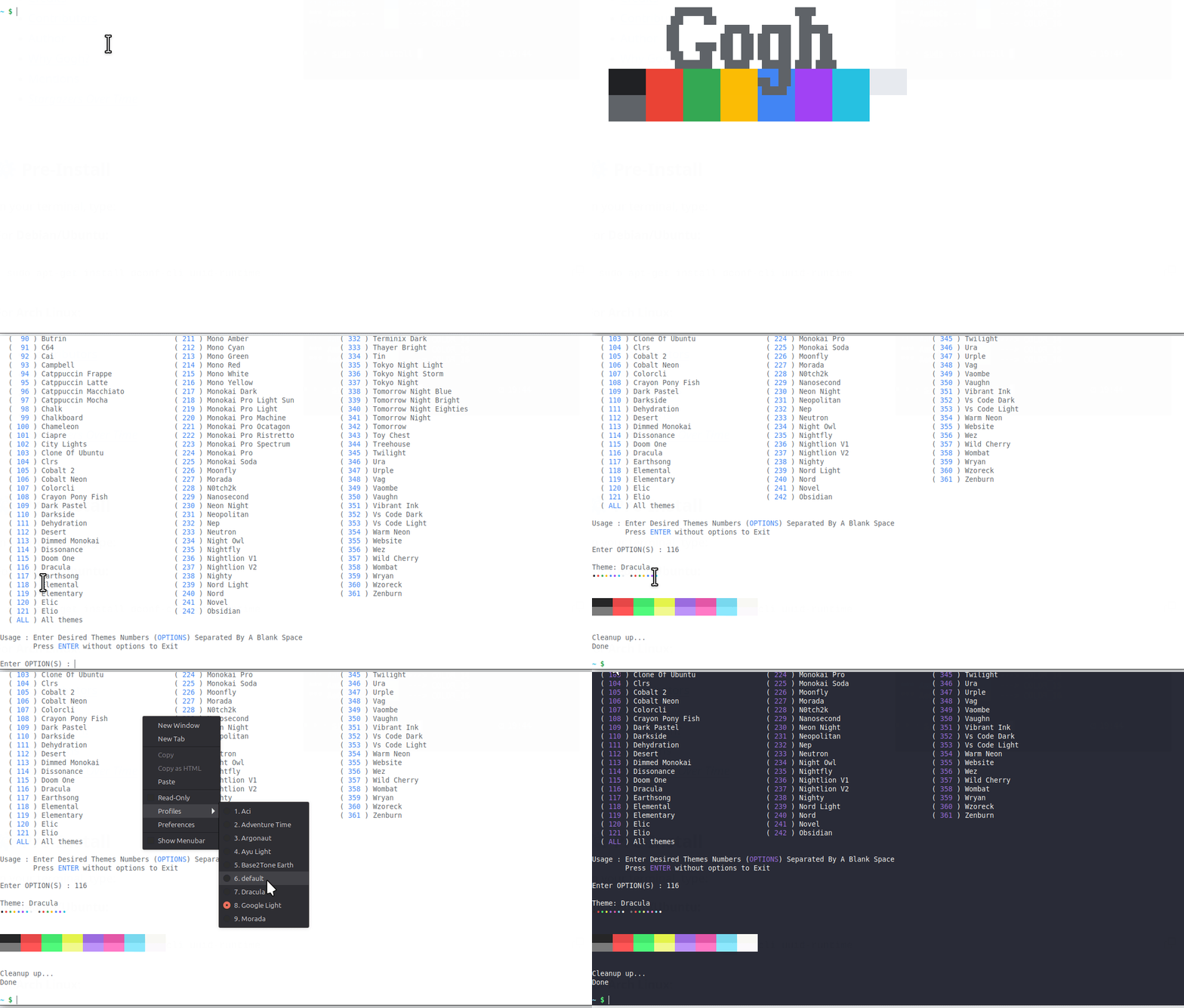
**2. Select your installed theme from your terminal.**
**DEMO:**
## ⚙️ Install (Non-Interactive Mode)
Two ways:
* Clone the repository.
* Download the only required files. (Bare Minimum!)
### Clone Repository
```bash
# Clone the repo into "$HOME/src/gogh"
mkdir -p "$HOME/src"
cd "$HOME/src"
git clone https://github.com/Gogh-Co/Gogh.git gogh
cd gogh
# necessary in the Gnome terminal on ubuntu
export TERMINAL=gnome-terminal
# necessary in the Alacritty terminal
pip install -r requirements.txt
export TERMINAL=alacritty
# Enter theme installs dir
cd installs
# install themes
./atom.sh
./dracula.sh
```
### Download the only required files. (Bare Minimum!)
```bash
# Download apply script
wget https://github.com/Gogh-Co/Gogh/raw/master/apply-colors.sh
# Download desired themes from ./installs/ like this:
wget https://github.com/Gogh-Co/Gogh/raw/master/installs/selenized-dark.sh
# Optional - download Alacritty dependency (may require additional python packages, see requirements.txt for more)
wget https://github.com/Gogh-Co/Gogh/raw/master/apply-alacritty.py
# Optional - download Terminator dependency (may require additional python packages, see requirements.txt for more)
wget https://github.com/Gogh-Co/Gogh/raw/master/apply-terminator.py
# You can also specify where to find the apply scripts with the following environmental variables:
GOGH_APPLY_SCRIPT=/path/to/apply-colors.sh
GOGH_ALACRITTY_SCRIPT=/path/to/apply-alacritty.py # only needed if applying to Alacritty terminal
GOGH_TERMINATOR_SCRIPT=/path/to/apply-terminator.py # only needed if applying to Terminator terminal
# Control Gogh behavior with the following:
TERMINAL=gnome-terminal # Select for which terminal to install the theme
# (see apply-colors.sh for all supported terminals)
GOGH_NONINTERACTIVE= # Make output silent and answer all prompts with default value
# (errors will still be printed)
GOGH_USE_NEW_THEME= # Make theme the currently used/default one of the terminal
# Actual effect may differ between terminals
# Supported terminals: xfce4-terminal
# Apply downloaded theme (apply script must be in the same folder)
TERMINAL=gnome-terminal bash ./selenized-dark.sh
# OR specify apply script path
GOGH_APPLY_SCRIPT=/path/to/file/apply-colors.sh bash ./selenized-dark.sh
```
## 💻 Terminal Support
Here are some terminals that Gogh is supported with:
- Alacritty - [Web](https://github.com/alacritty/alacritty)
- Cygwin - [Web](https://www.cygwin.com/)
- Foot - [Web](https://codeberg.org/dnkl/foot)
- Gnome - [Web](https://help.gnome.org/users/gnome-terminal/stable/)
- Guake - [Web](http://guake-project.org/)
- iTerm - [Web](https://iterm2.com/)
- Kitty - [Web](https://sw.kovidgoyal.net/kitty/)
- Konsole - [Web](https://konsole.kde.org/)
- Mate - [Web](https://github.com/mate-desktop/mate-terminal)
- Mintty - [Web](https://mintty.github.io/)
- Pantheon / Elementary - [Web](https://github.com/elementary/terminal)
- Tilix - [Web](https://gnunn1.github.io/tilix-web/)
- Wezterm - [Web](https://wezterm.org/)
- XFCE4 - [Web](https://docs.xfce.org/apps/terminal/start)
- Terminator - [Web](https://github.com/gnome-terminator/terminator)
## 🎨 [Themes](https://Gogh-Co.github.io/Gogh/)
We have lots of themes in stock! Check them out [here](https://Gogh-Co.github.io/Gogh/)!
- **json**: https://raw.githubusercontent.com/Gogh-Co/Gogh/master/data/themes.json
- **json min**: https://raw.githubusercontent.com/Gogh-Co/Gogh/master/data/themes-min.json
- **csv**: https://raw.githubusercontent.com/Gogh-Co/Gogh/master/data/themes.csv
## 👀 [WCAG](https://Gogh-Co.github.io/Gogh/wcag) - Accessibility Contrast
- **Web**: https://gogh-co.github.io/Gogh/wcag
- **wcag**: https://raw.githubusercontent.com/Gogh-Co/Gogh/master/data/wcag.json
- **wcag min**: https://raw.githubusercontent.com/Gogh-Co/Gogh/master/data/wcag-min.json
- More information: https://webaim.org/resources/contrastchecker/
## ❓ HELP
- [Ubuntu 19.10: default_profile not a valid identifier, command not found](https://github.com/Gogh-Co/Gogh/issues/203)
- [Using Elementary terminal but says unsupported](https://github.com/Gogh-Co/Gogh/issues/175)
- [Doesn't working Debian](https://github.com/Gogh-Co/Gogh/issues/63)
- [Not Working on Ubuntu](https://github.com/Gogh-Co/Gogh/issues/41)
- `sudo apt install gconf2` - https://github.com/Gogh-Co/Gogh/issues/334#issuecomment-1374541799
### 🔹 Debian Fixes
#### [Fix 1](https://github.com/Gogh-Co/Gogh/issues/63#issuecomment-361071956) (@romzie):
- Reset your profiles:
```bash
dconf reset -f /org/gnome/terminal/legacy/profiles:/
```
#### [Fix 2](https://github.com/Gogh-Co/Gogh/issues/63#issuecomment-401224491) (@MalwareJedi):
- Reset your profiles:
```bash
dconf reset -f /org/gnome/terminal/legacy/profiles:/
```
- Close your terminal; re-open it.
- Go to **Edit** ---> **Preferences** ---> **Profiles**.
- Create a **new** profile called **Default**.
- Close the terminal. re-open it.
- Confirm that **Default** is still listed in your profiles.
- If it is, run the Gogh script again.
#### [Fix 3](https://github.com/Gogh-Co/Gogh/issues/63#issuecomment-401510226) (@sui74):
- Reset your profiles:
```bash
dconf reset -f /org/gnome/terminal/legacy/profiles:/
```
- "Unname" Rename profile called "default".
```bash
sudo apt install uuid-runtime
```
- Run the Gogh script.
### 🔹 Elementary OS
1 - Uncomment the following line in `.bashrc` ;you can find this file in your `/home/USER/` directory.
```bash
#force_color_prompt=yes
```
2 - Execute in terminal
```bash
source .bashrc
```
## 🖼️ Create your Own Theme!
Good news! Now, creating themes are easier than ever.
All you need to do is to create a YAML format file, following the example of the other files in the `themes` folder.
Some rules to keep in mind:
- The file name should match the name of the theme. For example:
- **Filename**: `Solarized Dark.yml`
- **Inside the .yml file**: `name: 'Solarized Dark'`
- Use title case for all words by capitalizing their first letter.
- Ensure that the contrast is sufficient for good legibility.
***Now, you can send your Pull Request***
**Thank you for collaborating!**
### Theme ".yml" template
If you indeed use this, replace the HEX values with your own ones.
```yml
---
name: 'Gogh'
author: '' # 'Author Name (http://website.com)'
variant: '' # Dark or Light
color_01: '#292D3E' # Black (Host)
color_02: '#F07178' # Red (Syntax string)
color_03: '#62DE84' # Green (Command)
color_04: '#FFCB6B' # Yellow (Command second)
color_05: '#75A1FF' # Blue (Path)
color_06: '#F580FF' # Magenta (Syntax var)
color_07: '#60BAEC' # Cyan (Prompt)
color_08: '#ABB2BF' # White
color_09: '#959DCB' # Bright Black
color_10: '#F07178' # Bright Red (Command error)
color_11: '#C3E88D' # Bright Green (Exec)
color_12: '#FF5572' # Bright Yellow
color_13: '#82AAFF' # Bright Blue (Folder)
color_14: '#FFCB6B' # Bright Magenta
color_15: '#676E95' # Bright Cyan
color_16: '#FFFEFE' # Bright White
background: '#292D3E' # Background
foreground: '#BFC7D5' # Foreground (Text)
cursor: '#BFC7D5' # Cursor
```
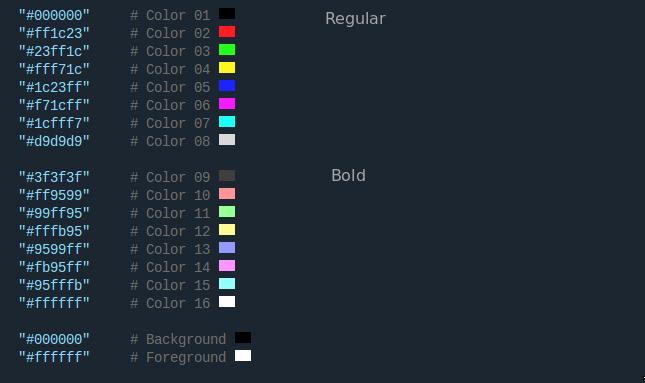
### Explanation of colors and variables
The colors of the terminal are composed of 18 colors in 3 sections.
Section 1: Regular text.
Section 2: Bold text.
Section 3: text and background.
The basic colors are 8:
- Black
- Red
- Green
- Yellow
- Blue
- Purple
- Cyan
- White
In comments variables is that of the console belongs each color.
Here is a picture that explains a little better as colors are distributed.
## 👨💻 As command line
**WARNING:** *Only if you know what you are doing or trust me :)*
```bash
sudo wget -O /usr/local/bin/gogh https://git.io/vQgMr && sudo chmod +x /usr/local/bin/gogh
```
Now in your terminal just type `gogh`:
```bash
gogh
```
You can also select themes directly with CLI arguments (skip the interactive list):
```bash
# by name/slug (recommended, stable)
gogh Dracula
gogh dracula nord-light
# all themes
gogh ALL
```
For one-line remote usage with arguments, pass `--` before the options:
```bash
bash -c "$(wget -qO- https://git.io/vQgMr)" -- Dracula
```
## 🌱 First commit:
Nov 18, 2013 - [aa9871e](https://github.com/Gogh-Co/Gogh/commit/aa9871e2d6008d5dc8986b90356fa7cf433a0bb3)
## :heart: Credits:
- [4bit](https://ciembor.github.io/4bit/)
- [Bluloco Light Theme](https://github.com/uloco/theme-bluloco-light)
- [Catppuccin](https://github.com/catppuccin)
- [Chalk](https://github.com/chalk/chalk) by [Sindre Sorhus](https://github.com/sindresorhus)
- [Dracula](https://github.com/dracula/dracula-theme) by [Zeno Rocha](https://github.com/zenorocha)
- [Elementary OS](https://elementary.io/)
- [Everblush](https://github.com/Everblush)
- [Everforest Dark & Light theme set](https://github.com/sainnhe/everforest) by [Sainnhe Park](https://github.com/sainnhe)
- [Fairy Floss](https://github.com/sailorhg/fairyfloss)
- [Flat Remix](https://github.com/daniruiz/flat-remix)
- [Flat UI Terminal Theme](https://dribbble.com/shots/1021755-Flat-UI-Terminal-Theme)
- [Gooey](http://simey.me/editor-themes/) by [Matt Harris](https://github.com/mdh34)
- [Gotham](https://github.com/whatyouhide/vim-gotham) by [Andrea Leopardi](https://github.com/whatyouhide)
- [Gruvbox](https://github.com/morhetz/gruvbox) by [Pavel Pertsev](https://github.com/morhetz)
- [Hemisu](https://noahfrederick.com/log/hemisu-for-os-x-terminal/) by [Noah Frederick](https://github.com/noahfrederick)
- [kokuban](https://github.com/ygkn/kokuban) by [ygkn](https://github.com/ygkn)
- [Monokai](https://web.archive.org/web/20161117102850/https://www.monokai.nl/blog/2006/07/15/textmate-color-theme) by [Wimer Hazenberg](https://github.com/monokai)
- [Nightfox](https://github.com/EdenEast/nightfox.nvim)
- [Ocean](https://github.com/fabianperez/ocean-dark-iterm) by [Fabian Perez](https://github.com/fabianperez)
- [Omni](https://github.com/getomni)
- [One Dark & Light theme set](https://github.com/nathanbuchar/one-dark-terminal) by [Nathan Buchar](https://github.com/nathanbuchar)
- [Panda](https://github.com/PandaTheme) by [Siamak](https://github.com/siamak)
- [Peppermint](https://noahfrederick.com/log/lion-terminal-theme-peppermint/) by [Noah Frederick](https://github.com/noahfrederick)
- [Rosé Pine](https://github.com/rose-pine)
- [Selenized](https://github.com/jan-warchol/selenized/)
- [SMYCK](http://color.smyck.org/) by [John-Paul Bader](https://github.com/hukl)
- [Snazzy](https://github.com/sindresorhus/hyper-snazzy) by [Sindre Sorhus](https://github.com/sindresorhus)
- [Solarized](https://ethanschoonover.com/solarized) by [Ethan Schoonover](https://github.com/altercation)
- [Sonokai](https://github.com/sainnhe/sonokai) by [Sainnhe Park](https://github.com/sainnhe)
- [Srcery](https://github.com/srcery-colors/srcery-terminal) by [Daniel Berg](https://github.com/roosta)
- [Summer Pop](https://github.com/guillermoap/Gogh) by [Guillermo Aguirre](https://github.com/guillermoap)
- [SynthWave '84 ](https://github.com/robb0wen/synthwave-vscode)
- [SynthWave Alpha](https://github.com/vikpe/synthwave-alpha)
- [Terminal Sexy](https://terminal.sexy) by [George Czabania](https://github.com/stayradiated)
- [Tilix](https://github.com/storm119/Tilix-Themes)
- [Tokyo Night](https://github.com/enkia/tokyo-night-vscode-theme)
- [Tomorrow color theme set](https://github.com/chriskempson/tomorrow-theme) by [Chris Kempson](https://github.com/chriskempson)
- Material theme by [Mitchel van Eijgen](https://gist.github.com/mvaneijgen/4c56701215847dd5ddcf) and [Liu Xinan](https://gist.github.com/xinan/ca2b82fef6aaa0d1e099)
- [KANAGAWA.nvim](https://github.com/rebelot/kanagawa.nvim)
- [Apprentice](https://romainl.github.io/Apprentice/)
- [Oxocarbon](https://github.com/nyoom-engineering/oxocarbon.nvim)
- [website-theme](https://github.com/shayanaqvi/website-theme)
## :heart: Contributors:
Many thanks to all who have participated in this project.
[@contributors](https://github.com/Gogh-Co/Gogh/graphs/contributors)

## 🧠 Author (contributor)
I cannot claim to be the only author of this project. Without the help of the people who have contributed, this would not have been possible. Therefore, that's why all contributors are listed first in this document. While I am listed as the author, the true authors are all those who are mentioned in the document. I would like to express my gratitude to all of them, as well as to future contributors.
- Miguel D. Quintero - [Lanet.co](https://lanet.co)
This project is here for anyone to use, no expectations.
If you want to buy me a coffee voluntarily, you can use this link.
[](https://paypal.me/mgldvd?country.x=CO&locale.x=es_XC)
## 🖌️ Why Gogh?
There is no blue without yellow and without orange.
-- [Vincent Van Gogh](https://en.wikipedia.org/wiki/Vincent_van_Gogh) --
## 📣 Mentions
- [VSCode Theme](https://marketplace.visualstudio.com/items?itemName=Avetis.gogh-theme)
- [Awesome-Shell](https://github.com/alebcay/awesome-shell)
- [Hipertextual](https://hipertextual.com/archivo/2014/11/4bit/)
- [MuyLinux](https://www.muylinux.com/2015/06/06/ping-91)
- [Reddit - elementaryos](https://www.reddit.com/r/elementaryos/comments/3ivnb7/how_to_change_terminals_colors/)
- [dev.to](https://dev.to/Gogh-Co/color-scheme-for-your-terminal-1pea)
- [Ubuntupit](https://www.ubuntupit.com/best-ubuntu-terminal-themes-and-color-schemes/)
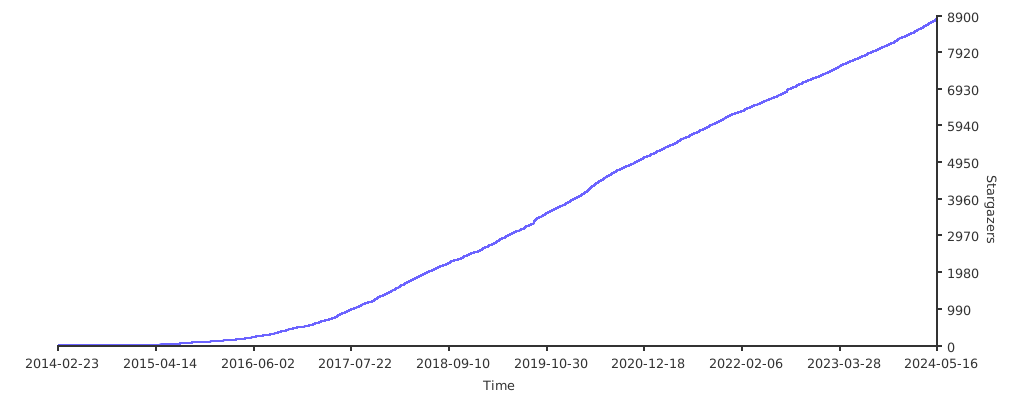
## 🌟 Stargazers Over Time
[](https://starchart.cc/Gogh-Co/Gogh)