# pumpbumb.gitee.io
**Repository Path**: pumpbumb/pumpbumb.gitee.io
## Basic Information
- **Project Name**: pumpbumb.gitee.io
- **Description**: 我的个人博客😊
- **Primary Language**: HTML
- **License**: Not specified
- **Default Branch**: main
- **Homepage**: None
- **GVP Project**: No
## Statistics
- **Stars**: 0
- **Forks**: 0
- **Created**: 2022-07-30
- **Last Updated**: 2023-01-10
## Categories & Tags
**Categories**: Uncategorized
**Tags**: None
## README
## Hello World
Hello World~ This is the blog that I record things.
这是我的个人博客,一路写写停停~
下面是博客搭建教程,更详细教程请戳[如何搭建jekyll主题的github.io博客](http://meilianwu.com/2018/05/31/blog-build.html)
## 使用
* 开始
* [环境](#环境)
* [修改配置](#修改配置)
* [撰写博客](#撰写博客)
* 组件
* [侧边栏](#侧边栏)
* [推荐标签](#featured-tags)
* [好友链接](#friends)
* [社交账号](#社交账号)
* 评论
* [gitalk评论插件](#gitalk评论插件)
### 环境
本地安装[jekyll](http://jekyllcn.com/),使用`jekyll serve`或`jekyll serve --watch`命令监听4000端口,打开`http://127.0.0.1:4000/`就可以预览修改内容,需要注意的是,`_config.yml`配置的修改需要重新执行命令。
### 修改配置
`_config.yml`配置文件中添加自己的信息
``` markdown
# Site settings
title: Wml Blog # blog title
SEOTitle: 吴美莲的博客 | Wml Blog # seo title
description: "前端开发" # seo description
url: "https://meilianwu.com/" # your host, for absolute URL
# Build settings
paginate: 5 # paginate number
plugins: [jekyll-paginate]
```
### 撰写博客
在`_posts`文件下添加新的博客文章,文章可以使用`markdown`编写,也可以使用`textile`格式编写,每篇文章头部都需要添加YAML头信息,它们会将文章内容转换成HTML页面。结构大致是
``` markdown
---
layout: post
title: "如何搭建jekyll主题的github.io博客"
subtitle: ""
author: "wml"
header-img: "img/blog-build-1.png"
header-mask: 0.5
catalog: true
tags:
- blog
---
```
### 侧边栏
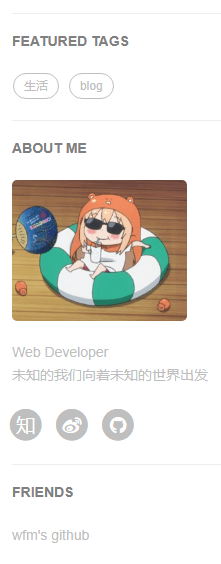
侧边栏的配置在`_config.yml`中
``` markdown
# Sidebar settings
sidebar: true # 是否使用侧边栏
sidebar-about-description: "Web Developer
未知的我们向着未知的世界出发" # 描述自己
sidebar-avatar: /img/avatar.png # 头像
```
### featured-tags
个人标签是否展示,在`_config.yml`中配置
``` markdown
# Featured Tags
featured-tags: true # whether or not using Feature-Tags
featured-condition-size: 1 # A tag will be featured if the size of it is more than this condition value
```
需要注意的是`featured-condition-size`: 如果一个标签的 SIZE,也就是使用该标签的文章数大于上面设定的条件值,这个标签就会在首页上被推荐。
内部有一个条件模板 `{% if tag[1].size > {{site.featured-condition-size}} %}` 是用来做筛选过滤的.
另外个人标签在每篇博客文章的头信息里添加;
``` markdown
tags:
- blog #添加了'blog'的标签
```
### friends
这里可以添加好友友情链接,设置也是在`_config.yml`里添加好友
``` markdown
# Friends
friends: [{
title: "wfm's github",
href: "https://github.com/wfm19970"
}]
```
### 社交账号
社交账号添加
``` markdown
# SNS settings
RSS: false
weibo_username: AnnualWu
zhihu_username: wml
github_username: wumeilian
```
在`_includes/footer.html`文件中有关于社交账号的展示,目前这里就列出了微博,知乎,推特,Facebook还有github的展示,如果想展示更多别的社交账号,只需要在文件下按以下格式添加即可,(eg.github的添加方式)
```html
{% if site.github_username %}
{% endif %}
```
### gitalk评论插件
本文使用的是gitalk评论插件
将这段代码插入`_layouts/_post.html`中
```html
```
创建一个[github application](https://github.com/settings/applications/new);将创建好产生的Client ID 和 Client Secret 填入你的我们 Gitalk 参数中,推送到远程仓库以后刷新每篇文章会产生一个issue,首次加载可能比较慢。