# FACSvatar
**Repository Path**: moeleader/FACSvatar
## Basic Information
- **Project Name**: FACSvatar
- **Description**: An Open Source Modular Framework From Face to FACS Based Avatar Animation (Unity3D / Blender)
- **Primary Language**: Python
- **License**: LGPL-3.0
- **Default Branch**: master
- **Homepage**: None
- **GVP Project**: No
## Statistics
- **Stars**: 0
- **Forks**: 0
- **Created**: 2019-02-20
- **Last Updated**: 2024-06-03
## Categories & Tags
**Categories**: Uncategorized
**Tags**: None
## README
# FACSvatar v0.3.4-Alpha
Orchestrate modules to enable OS and software independent interactive facial animation.
# Paper
Please cite the following paper when using this framework in a paper:
[van der Struijk, Stef and Huang, Hung-Hsuan and Mirzaei, Maryam Sadat and Nishida, Toyoaki "FACSvatar: An Open Source Modular Framework for Real-Time FACS based Facial Animation" In Proceedings of 18th ACM International Conference on Intelligent Virtual Agents (pp. 159-164). ACM, 2018.](https://dl.acm.org/citation.cfm?id=3267918)
DOI: https://doi.org/10.1145/10.1145/3267851.3267918
ISBN: 978-1-4503-6013-5/18/11
# Documentation
## Quickstart (NEW):
FACSvatar is tested on Ubuntu and Windows, but should work on MacOS.
More [detailed quickstart](https://facsvatar.readthedocs.io/en/latest/quickstart.html).
0. Downloads - Go to the [release page of this GitHub repo](https://github.com/NumesSanguis/FACSvatar/releases) and download:
* openface_2.1.0_zeromq.zip
* Unzip and execute `download_models.sh or .ps1` to download trained models
* Windows 7 / 8 / 10 Home: unity_FACSvatar_standalone_docker-ip.zip
* Windows 10 Pro / Enterprise / Education: unity_FACSvatar_standalone.zip
* Windows / Linux / Mac: [Unity3D editor (documentation)](https://facsvatar.readthedocs.io/en/latest/defaultsetup.html#unity3d-game-engine)
* Source code (zip / tar.gz) or download this repository with:
* `git clone https://github.com/NumesSanguis/FACSvatar.git`
* Press the green `Clone or Download` button on this page --> `Download ZIP`
1. Docker Install - Let's you execute applications without worrying about OS or programming language.
* [General Docker instructions](https://docs.docker.com/install/#supported-platforms)
* [Docker Toolbox for Windows 7/8/10 Home](https://docs.docker.com/toolbox/overview/)
* [Docker for Windows 10 Pro, Enterprise or Education](https://docs.docker.com/docker-for-windows/install/#what-to-know-before-you-install)
* Ubuntu: [Docker](https://docs.docker.com/install/linux/docker-ce/ubuntu/) and [docker-compose](https://docs.docker.com/compose/install/) and `sudo usermod -a -G docker $USER`
2. Docker Modules - Open a terminal (W7/8: cmd.exe / W10: PowerShell) and navigate to folder `FACSvatar/modules`, then execute:
1. `docker-compose pull` (Downloads FACSvatar Docker containers)
2. `docker-compose up` (Starts downloaded Docker containers)
3. Facial Animation with Unity3D - Navigate inside folder unity_FACSvatar_standalone(_docker-ip) and Double-click `unity_FACSvatar.exe` / Press play button in Unity3D editor
### Offline version:
4. Open a 2nd terminal in folder `FACSvatar/modules` and execute: `docker-compose exec facsvatar_facsfromcsv bash`
5. Inside Docker container - Start facial animation with: `python main.py --pub_ip facsvatar_bridge`
### With webcam for real-time (Windows only for now):
4. Navigate inside folder `openface_x.x.x_zeromq`
5. (Windows 7/8/10 Home - only) Get Docker machine ip by opening a 2nd terminal and execute: `docker-machine ip` (likely to be 192.168.99.100)
6. (Windows 7/8/10 Home - only) Open `config.xml`, change `127.0.0.1` to `machine ip from step 3` (`192.168.99.100`) and save and close.
7. Double click `OpenFaceOffline.exe` –> menu: File –> Open Webcam
### Unity3D
Use the numbers 0, 1, 2 on your keyboard to change camera.
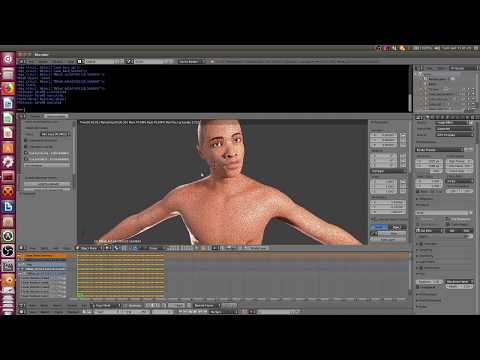
## Quickstart video (NEW)
See the quickstart video:
[](https://www.youtube.com/watch?v=OOoXDfkn8fk)
## Full documentation
[Read the FACSvatar documentation](https://facsvatar.readthedocs.io/en/latest/)!
It contains everything you need to know about how to use FACSvatar. Including a slightly more detailed quickstart.
# Roadmap
## New v0.3.4-alpha - Happy New Year!
* Dockerized core modules for easy setup and automatic IP configuration between modules
* Bridge and GUI are now in a separate folder, following other modules, to accommodate Docker
* Update ZeroMQ OpenFace to v2.1.0
* Unity3D to 2018.2.20f1
## New v0.3.3-alpha
* Decent improvements in documentation! (v0.3.3.1: own videos .csv + Blender FACS sliders)
* GUI in Jupyter Notebook working again with new code base
* Deep Learning module Python file renamed to `main.py` for consistency
## New/changes v0.3.2-alpha
* Simplified sending receiving messages (`facsvatarzeromq.py` now takes care of encoding / decoding and adding timestamps)
* Timestamp of message receive and send per module (`if Python >= 3.7: time.time_ns(), else time.time()`)
* Timestamp unified as string (ascii), formatted as 100 nanosecond precision integer, across modules; Default message parts: topic (string - ascii), timestamp (string - ascii), data (JSON formatted string - utf8)
* Performance improvement: Time taken for smoothing per message reduced (asynchronous): 11.90 +/- 6.91 milliseconds to 6.83 +/- 2.79 milliseconds (pandas --> direct numpy)
* In progress: print() --> logger
* `process_facstoblend` module accepts folder argument for different AU --> Blend Shape conversions
* OpenFace modification updated to v2.0.6
* Directly integrated with FACSHuman
## New v0.3.1-alpha
* OpenFace v2.0.3
* Eye movement based on eye gaze data
* Multi-user data support
* Multi-user animation in Unity3D
* Unity3D (2018.1.7f1) scene in cafe
* Scan folder and select (all) files with 1 command
* Switch targeted user of AU data for DNN (through GUI)
* Voice Activity Detection (VAD) to switch DNN user
* Mix participant AU / head pose data with DNN generated
---
## TODO v0.4.0-beta
From beta changes will be documented
* Documentation
* Python modules:
* Standardization pass over all modules / code clean-up
* Consistency fix: ROUTER / DEALER sockets use JSON formatted data
* DOC string per class and function
* Logger instead of print() statements
* Debug as option to enable logger
* File structure for proper import of modules / pip?
* Use config file (in addition to command line arguments) + config filepath argument
* Easy run: Docker container per module + Docker Compose
* Demo video
* Extra: Test FACSvatar on Android with Unity3D
## TODO vx.x.x
* Module management (Between modules: hearthbeat, controller, synchronized start, etc)
* Blender add-on (after Blender 2.8 release)
* New FACS face-rig when MBLAB characters facial expression system has been updated
* Facial rig for easy modification (animation purposes)
* Unreal Engine support
# Description
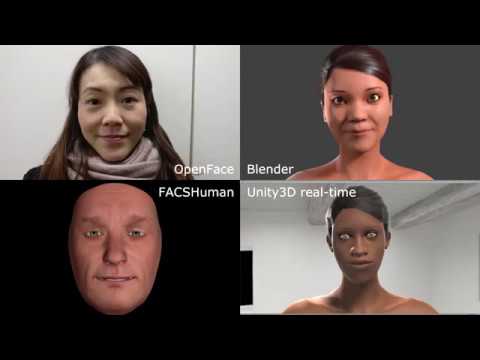
Affective computing and avatar animation both share that a person's facial expression contains useful information. Up until now, these fields use different processes to obtain and use these data. FACSvatar combines both purposes in a single framework. Empower your Embodied Conversational Agents (ECAs)!
* **Affective computing**: Facial expressions can not only be analyzed, but also be used to generate animation, purely on data.
* **Animators**: Capture facial expressions with a standard webcam and use it to animate any compatible avatar.
This interoperability is possible, because FACSvatar uses the [Facial Action Coding System (FACS)](https://en.wikipedia.org/wiki/Facial_Action_Coding_System "https://en.wikipedia.org/wiki/Facial_Action_Coding_System") by Paul Ekman as an intermediate data representation. FACS describes facial expressions in terms of muscle groups, called Action Units (AUs). By giving these AUs a value between 0-1, we can describe the contractions / relaxation of facial muscles.
[](https://www.youtube.com/watch?v=J2FvrIl-ypU)
# Modules & cross-platform
This framework is tested on both Windows and Linux (Ubuntu).
Everything in this framework is modular! Models look low quality? Use different models which can be animated by FACS (or convert FACS to matching Blend Shapes). You made a better FACS extractor (with e.g. a depth camera)? Use that instead! Want more intelligence, add your own modules for extended functionality!
The modularity is made possible by using [ZeroMQ - brokerless messaging library](http://zeromq.org/). Data is transfered between sockets in a Publisher-Subscriber pattern. Therefore, modules don't need to know where the data comes from, or who uses their data. This makes it easy to add/remove modules, no matter the programming language.
# Functionality
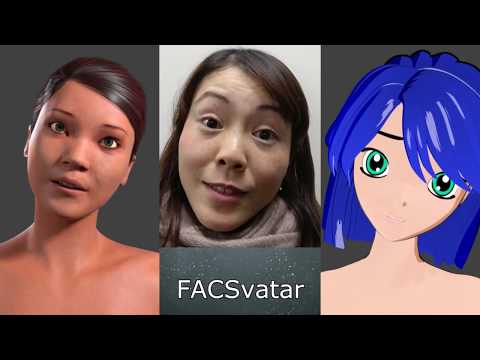
* Stream your facial expressions in real-time into Unity 3D
* Set Shape Keys in Blender with your facial expressions for high-quality rendering and/or export your facial animation for classic trigger-based animation in e.g. games.
[](https://www.youtube.com/watch?v=ImB3it_26bc)
* Deep Neural Network generation of facial expressions for Human-Agent Interaction (See `modules/process_facsdnnfacs`)
* [your modules] Please add your own modules, release your code, wrap it in a Docker container and let's expand the functionality of this framework :) More details in the documentation.
## Detailed workings (English & 日本語)
[](https://surafusoft.eu/facsvatar/files/2018/10/FACSvatar_poster_25_A4.png)
More can be found on the project's website: [FACSvatar homepage](https://surafusoft.eu/facsvatar/ "https://surafusoft.eu/facsvatar/").
## Software
* [Blender](https://www.blender.org/) + [Manuel Bastioni Lab add-on](~~http://www.manuelbastioni.com/~~ https://github.com/animate1978/MB-Lab) (create human models)
* [MBlab wikia](http://manuelbastionilab.wikia.com/wiki/Manuel_Bastioni_Lab_Wiki)
* [FACSHuman](https://www.michaelgilbert.fr/facshuman/) add-on for MakeHuman
* [OpenFace](https://github.com/TadasBaltrusaitis/OpenFace) (extract FACS data)
* [Unity 3D](https://unity3d.com/) 2018.2.20f1 (animate in game engine)
* [ZeroMQ (PyZMQ)](http://zeromq.org/) (distributed messaging library)
* [Docker](https://www.docker.com/) (containerization for easy distribution)