# umi-plugin-proxy
**Repository Path**: mirrors_umijs/umi-plugin-proxy
## Basic Information
- **Project Name**: umi-plugin-proxy
- **Description**: Resource proxy function, you can point online resources to local resources, support https and solve combob
- **Primary Language**: Unknown
- **License**: MIT
- **Default Branch**: master
- **Homepage**: None
- **GVP Project**: No
## Statistics
- **Stars**: 0
- **Forks**: 0
- **Created**: 2020-08-18
- **Last Updated**: 2026-07-11
## Categories & Tags
**Categories**: Uncategorized
**Tags**: None
## README
# umi-plugin-proxy
[](https://npmjs.org/package/umi-plugin-proxy)
[](https://npmjs.org/package/umi-plugin-proxy)
Resource proxy function, you can point online resources to local resources, support https and solve combob
资源代理功能,可以将线上资源有规则指向本地资源,支持https和解commob能力
## Usage
Configure in `.umirc.js`,
```js
export default {
plugins: [["umi-plugin-proxy", options]]
};
```
### rewrite
将请求的资源映射到特定的 url,比如可以把线上的 js,css 映射到本地 webpack dev server 对应的文件或者本地文件,配置规则如下, rule 是需要匹配的正则表达式,dest 是映射后的 url,通过\$n 来引用 rule 中正则匹配到的部分
```js
{
enable: true,
proxy: {
// 例如
// 匹配 /trip/titan/1.0.0/umi.js -> https://127.0.0.1:7000/umi.js
rewrite: [{
rule: /trip\/titan\/([\d\.]*)\/(.*).js/,
dest: 'https://127.0.0.1:7000/$2.js'
}, {
rule: /trip\/titan\/([\d\.]*)\/(.*)\.css/,
dest: 'https://127.0.0.1:7000/$2.css'
}]
}
}
```
### forward
把 combo 的多个线上的 url 解 combo 后代理到目标地址,类似 rewrite,不同的是可以处理 combo 的文件
```js
proxy: {
forward: [
{
project: "trip/titan", // 格式为:${group}/${repo}
dest: "http://127.0.0.1:7000/"
}
];
}
```
## 证书认证
添加 `umi cert` 命令可以认证本地的 `https` 证书
```shell
$ umi cert
```
## HTTPS
1. 需要将`anyproxy`生成的`CA`认证,放入到系统钥匙串中,系统
```
$ umi cert
证书安装完成
detecting CA status...
AnyProxy CA exists, but not be trusted
? Would you like to open the folder and trust it ? Yes
```
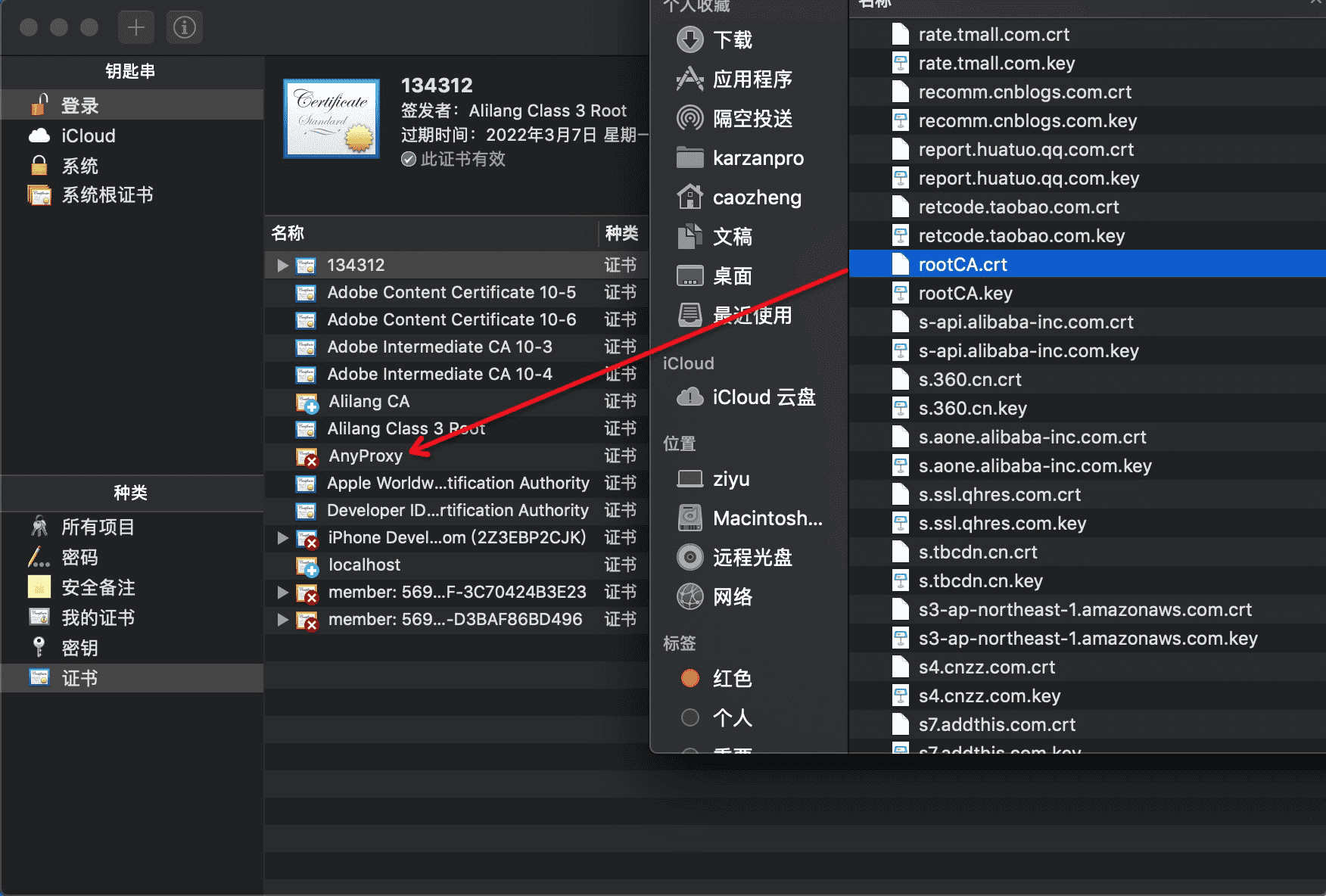
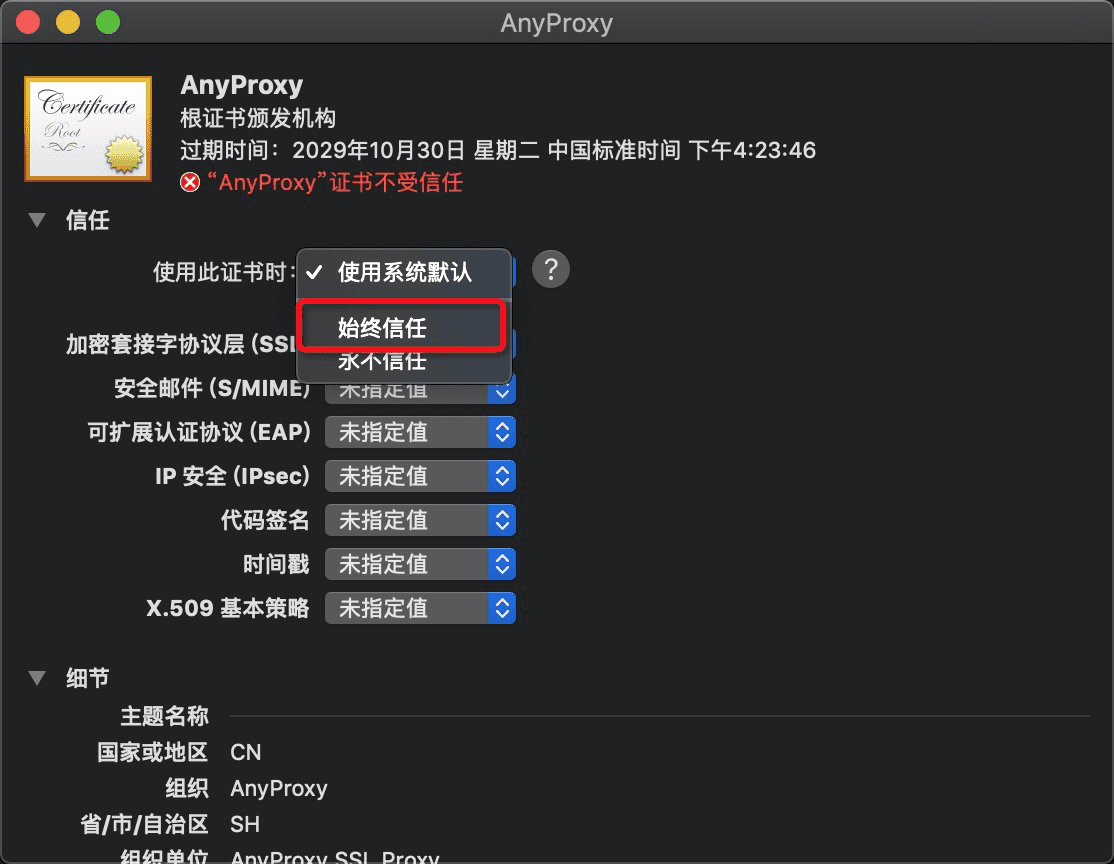 2. `umi cert`运行后同时将在根目录生成 2 个 `pem` 文件
```
project
│ .umirc.js
│ localhost+2-key.pem
│ localhost+2.pem
│ package.json
```
3. 在根目录修改`.env`文件,填写`CERT`、`KEY`文件目录
```
HTTPS=true
CERT=./localhost+2.pem
KEY=./localhost+2-key.pem
# PORT=7000
# SOCKET_SERVER=https://127.0.0.1:7000
```
4. 完成 重新编译即可
```
$ umi dev
```
## LICENSE
MIT
2. `umi cert`运行后同时将在根目录生成 2 个 `pem` 文件
```
project
│ .umirc.js
│ localhost+2-key.pem
│ localhost+2.pem
│ package.json
```
3. 在根目录修改`.env`文件,填写`CERT`、`KEY`文件目录
```
HTTPS=true
CERT=./localhost+2.pem
KEY=./localhost+2-key.pem
# PORT=7000
# SOCKET_SERVER=https://127.0.0.1:7000
```
4. 完成 重新编译即可
```
$ umi dev
```
## LICENSE
MIT