# RetroPie-Profiles
**Repository Path**: mirrors_TooTallNate/RetroPie-Profiles
## Basic Information
- **Project Name**: RetroPie-Profiles
- **Description**: RetroPie plugin to create profiles for save files and save states
- **Primary Language**: Unknown
- **License**: Not specified
- **Default Branch**: master
- **Homepage**: None
- **GVP Project**: No
## Statistics
- **Stars**: 0
- **Forks**: 0
- **Created**: 2020-08-18
- **Last Updated**: 2026-07-11
## Categories & Tags
**Categories**: Uncategorized
**Tags**: None
## README
# RetroPie-Profiles  ### RetroPie plugin to select which profile to use for save files and save states
This is a [RetroPie][] plugin that adds an entry to the `RetroPie` "system" in
EmulationStation. It provides a UI for logging in to your RetroPie via a login
server on your mobile device.
Specifically, this plugin is responsible for setting the `savefile_directory` and
`savestate_directory` values in the `retroarch.cfg` file. This way, you can have
different "profiles" of saves for when different people are using RetroPie.
I wrote this because my brother is always coming over to my house and wants to be
able to resume his game saves from home and vice versa. When using this plugin in
combination with [`sshfs`][sshfs] we share save files and ROMs over the cloud ☁️
## Installation
Clone the repo, or extract a tarball of `master` branch to your RetroPie and run
the `install.sh` script:
``` bash
$ curl -L https://git.io/v1i5K | tar xzvf - --strip-components=1 -C RetroPie-profiles
$ cd RetroPie-profiles
$ ./install.sh
```
And you should see something like:
```
Putting "login.sh" in "/home/pi/RetroPie/retropiemenu/"... OK!
Putting "icon.png" in "/home/pi/RetroPie/retropiemenu/icons"... OK!
Creating a gamelist.xml entry for login.sh... OK!
```
Then restart EmulationStation and you should see "Save Profiles" in your RetroPie
system menu:

## Login Servers
The "login server" is the URL in which you will visit on your mobile device when
the login dialog is open in RetroPie to change users. The URL is specified in
the `retroarch.cfg` file under the `save_profiles_login_server` config key.
The plugin will prompt you one time for the login server URL,
if the key is not already set:
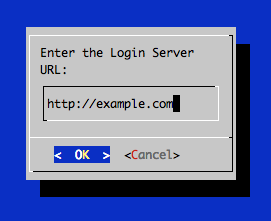
A login server can have any logic implemented for the login mechanism.
Take a look at the list of known login server implementations for some examples:
- [Facebook Login][fb] - Login using your Facebook profile
Send a pull request to add yours to the list!
If you would like to implement your own login server using Node.js, then
it is recommended to use the [`RetroPie-profiles-server`][server] helper.
## RetroArch config
This plugin uses the following keys in the `retroarch.cfg` configuration file:
| Key | Purpose |
|------------------------------|------------------------------------------------------------------------------------------------------------------------------|
| `savefile_directory` | When a user logs in, this gets set to the directory for the user's save files. |
| `savestate_directory` | When a user logs in, this gets set to the directory for the user's save states. |
| `save_profiles_login_server` | The HTTP or HTTPS server URL to connect to for profile authentication. Prompts for input when not set. |
| `save_profiles_directory` | Specify which directory to store profiles, including save files and save states. Defaults to `$HOME/RetroPie/save-profiles`. |
| `save_profiles_current_id` | The ID of the currently logged in user profile. |
| `save_profiles_current_name` | The display name of the currently logged in user profile. |
## License
(The MIT License)
Copyright (c) 2016 Nathan Rajlich <n@n8.io>
Permission is hereby granted, free of charge, to any person obtaining
a copy of this software and associated documentation files (the
'Software'), to deal in the Software without restriction, including
without limitation the rights to use, copy, modify, merge, publish,
distribute, sublicense, and/or sell copies of the Software, and to
permit persons to whom the Software is furnished to do so, subject to
the following conditions:
The above copyright notice and this permission notice shall be
included in all copies or substantial portions of the Software.
THE SOFTWARE IS PROVIDED 'AS IS', WITHOUT WARRANTY OF ANY KIND,
EXPRESS OR IMPLIED, INCLUDING BUT NOT LIMITED TO THE WARRANTIES OF
MERCHANTABILITY, FITNESS FOR A PARTICULAR PURPOSE AND NONINFRINGEMENT.
IN NO EVENT SHALL THE AUTHORS OR COPYRIGHT HOLDERS BE LIABLE FOR ANY
CLAIM, DAMAGES OR OTHER LIABILITY, WHETHER IN AN ACTION OF CONTRACT,
TORT OR OTHERWISE, ARISING FROM, OUT OF OR IN CONNECTION WITH THE
SOFTWARE OR THE USE OR OTHER DEALINGS IN THE SOFTWARE.
[RetroPie]: https://retropie.org.uk/
[sshfs]: https://github.com/libfuse/sshfs
[fb]: https://github.com/TooTallNate/RetroPie-profiles-facebook-login
[server]: https://github.com/TooTallNate/RetroPie-profiles-server
### RetroPie plugin to select which profile to use for save files and save states
This is a [RetroPie][] plugin that adds an entry to the `RetroPie` "system" in
EmulationStation. It provides a UI for logging in to your RetroPie via a login
server on your mobile device.
Specifically, this plugin is responsible for setting the `savefile_directory` and
`savestate_directory` values in the `retroarch.cfg` file. This way, you can have
different "profiles" of saves for when different people are using RetroPie.
I wrote this because my brother is always coming over to my house and wants to be
able to resume his game saves from home and vice versa. When using this plugin in
combination with [`sshfs`][sshfs] we share save files and ROMs over the cloud ☁️
## Installation
Clone the repo, or extract a tarball of `master` branch to your RetroPie and run
the `install.sh` script:
``` bash
$ curl -L https://git.io/v1i5K | tar xzvf - --strip-components=1 -C RetroPie-profiles
$ cd RetroPie-profiles
$ ./install.sh
```
And you should see something like:
```
Putting "login.sh" in "/home/pi/RetroPie/retropiemenu/"... OK!
Putting "icon.png" in "/home/pi/RetroPie/retropiemenu/icons"... OK!
Creating a gamelist.xml entry for login.sh... OK!
```
Then restart EmulationStation and you should see "Save Profiles" in your RetroPie
system menu:

## Login Servers
The "login server" is the URL in which you will visit on your mobile device when
the login dialog is open in RetroPie to change users. The URL is specified in
the `retroarch.cfg` file under the `save_profiles_login_server` config key.
The plugin will prompt you one time for the login server URL,
if the key is not already set:

A login server can have any logic implemented for the login mechanism.
Take a look at the list of known login server implementations for some examples:
- [Facebook Login][fb] - Login using your Facebook profile
Send a pull request to add yours to the list!
If you would like to implement your own login server using Node.js, then
it is recommended to use the [`RetroPie-profiles-server`][server] helper.
## RetroArch config
This plugin uses the following keys in the `retroarch.cfg` configuration file:
| Key | Purpose |
|------------------------------|------------------------------------------------------------------------------------------------------------------------------|
| `savefile_directory` | When a user logs in, this gets set to the directory for the user's save files. |
| `savestate_directory` | When a user logs in, this gets set to the directory for the user's save states. |
| `save_profiles_login_server` | The HTTP or HTTPS server URL to connect to for profile authentication. Prompts for input when not set. |
| `save_profiles_directory` | Specify which directory to store profiles, including save files and save states. Defaults to `$HOME/RetroPie/save-profiles`. |
| `save_profiles_current_id` | The ID of the currently logged in user profile. |
| `save_profiles_current_name` | The display name of the currently logged in user profile. |
## License
(The MIT License)
Copyright (c) 2016 Nathan Rajlich <n@n8.io>
Permission is hereby granted, free of charge, to any person obtaining
a copy of this software and associated documentation files (the
'Software'), to deal in the Software without restriction, including
without limitation the rights to use, copy, modify, merge, publish,
distribute, sublicense, and/or sell copies of the Software, and to
permit persons to whom the Software is furnished to do so, subject to
the following conditions:
The above copyright notice and this permission notice shall be
included in all copies or substantial portions of the Software.
THE SOFTWARE IS PROVIDED 'AS IS', WITHOUT WARRANTY OF ANY KIND,
EXPRESS OR IMPLIED, INCLUDING BUT NOT LIMITED TO THE WARRANTIES OF
MERCHANTABILITY, FITNESS FOR A PARTICULAR PURPOSE AND NONINFRINGEMENT.
IN NO EVENT SHALL THE AUTHORS OR COPYRIGHT HOLDERS BE LIABLE FOR ANY
CLAIM, DAMAGES OR OTHER LIABILITY, WHETHER IN AN ACTION OF CONTRACT,
TORT OR OTHERWISE, ARISING FROM, OUT OF OR IN CONNECTION WITH THE
SOFTWARE OR THE USE OR OTHER DEALINGS IN THE SOFTWARE.
[RetroPie]: https://retropie.org.uk/
[sshfs]: https://github.com/libfuse/sshfs
[fb]: https://github.com/TooTallNate/RetroPie-profiles-facebook-login
[server]: https://github.com/TooTallNate/RetroPie-profiles-server