# FreeTex
**Repository Path**: leeround/FreeTex
## Basic Information
- **Project Name**: FreeTex
- **Description**: No description available
- **Primary Language**: Unknown
- **License**: GPL-3.0
- **Default Branch**: main
- **Homepage**: None
- **GVP Project**: No
## Statistics
- **Stars**: 0
- **Forks**: 0
- **Created**: 2025-06-13
- **Last Updated**: 2025-06-13
## Categories & Tags
**Categories**: Uncategorized
**Tags**: None
## README
## 🌟 Introduction
FreeTex is a free intelligent formula recognition software that identifies mathematical formulas in images and converts them into editable LaTeX format.
Features:
* **No Internet Needed, No Waiting**
The locally deployed model requires no internet connection, ensuring full data privacy.
* **Multi-type Image Recognition**
Supports recognition of handwritten, printed, and scanned images.
* **Foolproof and Easy to Use**
Supports uploading images, screenshots, and clipboard pasting. Also supports hotkeys to improve efficiency.
* **Multi-format Result Export**
Recognized results can be copied with one click in Word or LaTeX format without extra steps.
* **Cross-platform Support**
Built with Python and compatible with Windows, Linux, and macOS.
Video demonstration and tutorial:
[](https://www.bilibili.com/video/BV1zPV2zVEMG)
## 📦 How to Use
### 1. Quick Start
1. **Download the Software**
For Windows (no installation required):
* [Baidu Netdisk](https://pan.baidu.com/s/12rtlWi6S8PxHL2NQew5_rg?pwd=8888) (Code: 8888)
* [Quark Netdisk](https://pan.quark.cn/s/65a205d8abb8)
For macOS:
* [Baidu Netdisk](https://pan.baidu.com/s/1NstYEU4TcWubJSAO8WcLTw?pwd=8888) (Code: 8888)
* [Quark Netdisk](https://pan.quark.cn/s/dac20f982f53)
2. **Install and Launch**
Refer to: [https://blog.csdn.net/qq1198768105/article/details/147739708](https://blog.csdn.net/qq1198768105/article/details/147739708)
### 2. Run from Source
#### Set Up Environment
Create a new environment:
```bash
conda create -n freetex python=3.10
conda activate freetex
```
Install dependencies:
```bash
pip install -r requirements.txt
```
Replace CPU-based PyTorch with GPU version:
```bash
pip install torch==2.4.0 torchvision==0.19.0 --index-url https://download.pytorch.org/whl/cu118
```
#### Download Model
Download the `unimernet_small` model and place it under `models`:
```bash
cd models
git lfs install
git clone https://huggingface.co/wanderkid/unimernet_small
```
#### Compile Resource Files
```bash
pyrcc5 resources/app.qrc -o resources/app_rc.py -compress 3
```
#### Launch Application
```bash
python main.py
```
Once running, the usage is the same as the quick start method above.
# 🏗️ Project Structure
```
FreeTex/
├── .gitignore
├── .python-version
├── LICENSE
├── README.md
├── README_EN.md
├── config.json
├── demo.yaml
├── docs/
│ ├── images/
│ ├── index.html
│ ├── script.js
│ └── style.css
├── libs/
│ ├── index.html
│ └── katex/
├── main.py
├── main.spec
├── models/
├── pyproject.toml
├── qfluentwidgets/
├── requirements.txt
├── resources/
├── scripts/
├── test_imgs/
├── tools/
├── unimernet/
└── uv.lock
```
## 📮 Notice
**Call for Bad Cases:** If you have encountered any cases where the model performs poorly, I would greatly appreciate it if you could share them in the issue.
## 🚀 Acknowledgements
This project is based on the following open-source projects:
* [UniMERNet](https://github.com/opendatalab/UniMERNet)
* [PyQt-Fluent-Widgets](https://github.com/zhiyiYo/PyQt-Fluent-Widgets)
* [KaTeX](https://github.com/KaTeX/KaTeX)
Thanks to all the contributors:
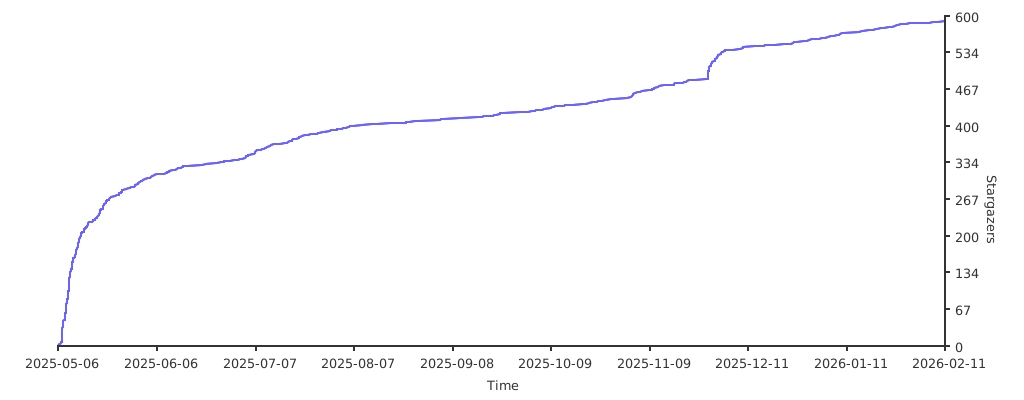
 ## Star History
## Star History


