The usual Toast, but with steroids.
## Prerequisites
相对与原项目的更改:
Toasty内部维护单一的toast对象,防止弹出无数的toast.
简化api调用
api安全化,可以在任何线程调用.
成功和失败的状态增加一种中央大块的UI.
通过方法上的L来标志duration是长还是短,不用再传入参数,选择相应方法即可.
Add this in your root `build.gradle` file (**not** your module `build.gradle` file):
```gradle
allprojects {
repositories {
...
maven { url "https://jitpack.io" }
}
}
```
## Dependency
Add this to your module's `build.gradle` file (make sure the version matches the JitPack badge above):
```gradle
dependencies {
...
compile 'com.github.hss01248:Toasty:2.0.6'
}
```
## Configuration
This step is optional, but if you want you can configure some Toasty parameters. Place this anywhere in your app:
```java
Toasty.Config.getInstance()
.setErrorColor(@ColorInt int errorColor) // optional
.setInfoColor(@ColorInt int infoColor) // optional
.setSuccessColor(@ColorInt int successColor) // optional
.setWarningColor(@ColorInt int warningColor) // optional
.setTextColor(@ColorInt int textColor) // optional
.tintIcon(boolean tintIcon) // optional (apply textColor also to the icon)
.setToastTypeface(@NonNull Typeface typeface) // optional
.setTextSize(int sizeInSp) // optional
.apply(); // required
```
You can reset the configuration by using `reset()` method:
```java
Toasty.Config.reset();
```
## Usage
Each method always returns a `Toast` object, so you can customize the Toast much more. no need to invoke the method "show()"
frist,init in Application:
```
/**
*
* @param context applicationcontext
* @param isDebug 是测试环境还是正式环境
* @param showInCenter 显示在什么地方.默认在底部,可以设置为屏幕中央.全局起作用
*/
public static void init(Context context,boolean isDebug,boolean showInCenter)
```
## change the default color:
```
setDefaultSuccessColor(String color)
setDefaultInfoColor(String color)
setDefaultInfoColor(String color)
setDefaultErrorColor(String color)
setDefaultTextColor(String color)
```
增加直接设置String resId的接口:
如:
```
MyToast.error(R.string.tips_not_empty)
```
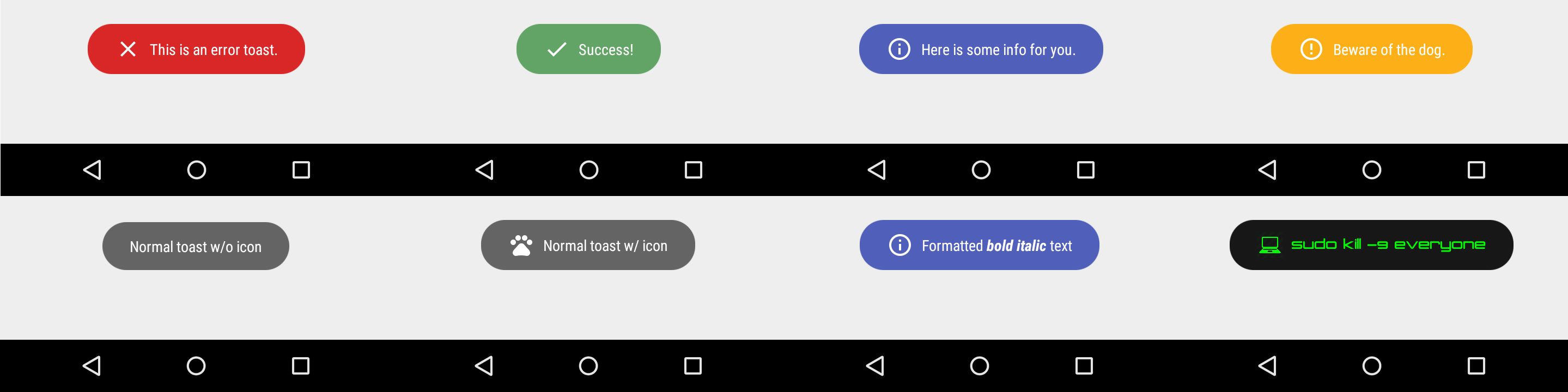
To display an error Toast:
``` java
MyToast.error("This is an error toast.")
```
To display a success Toast:
``` java
MyToast.success("Success!")
```
To display an info Toast:
``` java
MyToast.info("Here is some info for you.")
```
To display a warning Toast:
``` java
MyToast.warn("Beware of the dog.")
```
To display the usual Toast:
``` java
MyToast.show("Normal toast w/o icon")
```
To display the usual Toast with icon:
``` java
MyToast.show(CharSequence text ,int resId)
```
diaplay some toast only in debug mode:
``` java
MyToast.debug(CharSequence text )
```
You can also create your custom Toasts with the `custom()` method:
``` java
Toasty.custom(yourContext, "I'm a custom Toast", yourIconDrawable, tintColor, duration, withIcon,
shouldTint).show();
```
## toast with Toast.LENGTH_LONG:
just call the method with L in the end , such as:
```
MyToast.successL("Success!")
MyToast.showL("Normal toast w/o icon")
```
## alternative state toast :
```
successBig(final CharSequence text)
errorBig(final CharSequence text)
```
the ui is :

toast with long text and \n:

### Extra
[You can pass formatted text to Toasty!](https://github.com/GrenderG/Toasty/blob/master/app/src/main/java/es/dmoral/toastysample/MainActivity.java#L98-L107)
**There are variants of each method, feel free to explore this library.**
## Screenshots
**Please click the image below to enlarge.**
Apps using Toasty
--
Want to be here? Open an `issue` or make a `pull request`.

 Apps using Toasty
--
Want to be here? Open an `issue` or make a `pull request`.
Apps using Toasty
--
Want to be here? Open an `issue` or make a `pull request`.