# hexo-theme-nova
**Repository Path**: jamling/hexo-theme-nova
## Basic Information
- **Project Name**: hexo-theme-nova
- **Description**: Hexo theme, used by https://www.ieclipse.cn
- **Primary Language**: JavaScript
- **License**: MIT
- **Default Branch**: master
- **Homepage**: None
- **GVP Project**: No
## Statistics
- **Stars**: 0
- **Forks**: 0
- **Created**: 2022-10-15
- **Last Updated**: 2022-10-15
## Categories & Tags
**Categories**: Uncategorized
**Tags**: None
## README
[](https://travis-ci.org/Jamling/hexo-theme-nova)
[](https://github.com/Jamling/hexo-theme-nova/releases/latest)
## Introduction ##
The nova is a [hexo](https://hexo.io) theme using swig template aimed to build your github project site conveniently.
The theme provided three layouts to demonstrate the page.
1. `post` for blog
2. `project` for github project page
3. `page` for other pages
Nova also provided lots of helper scripts as plugins to co-work with the theme, e.g. donate, toc, project side bar.
Welcome to visit [My blog](https://www.ieclipse.cn/en/) (https://www.ieclipse.cn/en/) to see the demo.
[Here is some special feature](https://www.ieclipse.cn/en/demo/) of Nova.
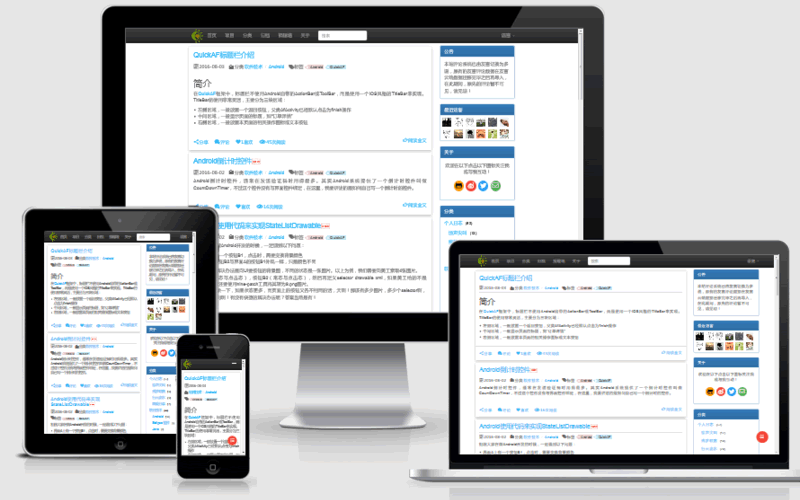
## ScreenShot
## Features
- Bootstrap responsible style
- Unique page ID for each page, there is nothing to worry about deploying blog to any site
- Multi-comment components support, include disqus, valine, ~~duoshuo~~, ~~gentie~~, changyan, ~~uayn~~ 3rd comment plugin
- Encrypt/decrypt for private post
- Frontend code highlight and copy feature
- Mircodata supported
## Change
### V0.2.0 (Huge)
- remove unvailable jiathis share
- remove material colors style (reduce css file size)
- change changyan comment to valine
- change zero clipboard to clipboard.js
- using nesting style
- pass w3c validations
## Install
Cd to your blog root directory
```bash
$ git clone git@github.com:Jamling/hexo-theme-nova.git themes/nova
```
Then change site _config.yml set `theme: nova` to use the theme
## Dependencies
Nova theme used some 3rd plugins to help. Need to install these plugins in your site/blog before using nova.
```powershell
npm install hexo-renderer-sass --save
npm install hexo-generator-i18n --save
npm install hexo-generator-github --save
npm install hexo-filter-highlight --save
```
- hexo-generator-github is unnecessary if no `project` layout page in your sources.
- hexo-filter-highlight is unnecessary if you don't like the nova highlight solution.
## Config
### js_css
Add global js and css sample:
```yaml
js_css:
- url: //cdn.bootcss.com/jquery/2.2.0/jquery.min.js
- url: //cdn.bootcss.com/bootstrap/3.3.6/css/bootstrap.min.css
- url: css/nova.css
```
### menu
Configurate the site menus
```yaml
menu:
- name: home
url: /
- name: project
url: /p/
- name: category
url: /categories/
- name: archive
url: /archives/
- name: about
url: /about/
```
**the name will be translated.**
### post widgets
```yaml
# post widgets. see layout/post/widget_xxx.swig
post_widgets:
# - search
- category
- tag
- archive
- recent
post_widgets_show_count: true
post_widgets_recent_count: 5
```
### archive
```yaml
# archive
archive:
type: yearly #yearly|monthly(defaut) see list_archives options
order: -1 # 1(asc)|-1(desc) defaut desc
format: YYYY
show_count: false # true|false, defaut true
amount: 5 # amount in post widgets
```
### toc
```yaml
# toc
toc:
post: true
project: true
page: true
```
### donate
```yaml
donate:
enable: true # whether enable page donate
```
The donate 2d-code image suggested to more than 200*200px and named to donate_aliplay.png, donate_wechat.png
### grid layout css
Configure the html page layout, the master branch use bootstrap, so the gird css is bootstrap grid css.
```yaml
layout:
index: # index some to post.
main: col-sx-12 col-sm-8 col-md-9 col-lg-9
widgets: col-sx-12 col-sm-4 col-md-3 col-lg-3 hidden-xs
page: #common page
main: col-sx-12 col-sm-8 col-md-9 col-lg-9
toc: col-sx-12 col-sm-4 col-md-3 col-lg-3 hidden-xs
p: #project
sidebar: col-sx-12 col-sm-12 col-md-2 col-lg-2
main: col-sx-12 col-sm-8 col-md-8 col-lg-8
toc: col-sx-2 col-sm-2 col-md-2 col-lg-2 hidden-xs
```
## Reference
### Layouts
Please see [nova layouts](https://www.ieclipse.cn/en/p/hexo-theme-nova/layouts.html)
### Front-matter
Please see [nova front-matter](https://www.ieclipse.cn/en/p/hexo-theme-nova/front-matter.html)
### Helpers
Please see [nova helpers](https://www.ieclipse.cn/en/p/hexo-theme-nova/helpers.html)
### Plugins
- [hexo-renderer-sass] helps to generate css.
- [hexo-generator-i18n] helps to generate multi-language sites.
- [hexo-generator-github] helps to generate project pages.
- [hexo-filter-highlight] Helps to highlight code block.
Please see [nova plugins](https://ieclipse.cn/en/p/hexo-theme-nova/plugins.html) for more information.
[lodash]: https://github.com/lodash/lodash
[cheerio]: https://github.com/cheeriojs/cheerio
[hexo-renderer-sass]: https://github.com/knksmith57/hexo-renderer-sass
[hexo-generator-github]: https://github.com/Jamling/hexo-generator-github/
[hexo-generator-i18n]: https://github.com/Jamling/hexo-generator-i18n/
[hexo-filter-highlight]: https://github.com/Jamling/hexo-filter-highlight/