# ccm_slam
**Repository Path**: hypocritezmf/ccm_slam
## Basic Information
- **Project Name**: ccm_slam
- **Description**: No description available
- **Primary Language**: Unknown
- **License**: GPL-3.0
- **Default Branch**: master
- **Homepage**: None
- **GVP Project**: No
## Statistics
- **Stars**: 0
- **Forks**: 0
- **Created**: 2020-12-11
- **Last Updated**: 2024-06-14
## Categories & Tags
**Categories**: Uncategorized
**Tags**: None
## README
# CCM-SLAM -- **C**entralized **C**ollaborative **M**onocular SLAM
**Version 1.0**
*For the newest version of CCM-SLAM (1.1), including functionalities to save and load maps, try out the ```devel``` branch*
# 1 Related Publications
[1] Patrik Schmuck and Margarita Chli. **Multi-UAV Collaborative Monocular SLAM**. *IEEE International Conference on Robotics and Automation (ICRA)*, 2017. **[PDF](https://www.research-collection.ethz.ch/bitstream/handle/20.500.11850/272499/eth-50606-01.pdf?sequence=1&isAllowed=y)**.
[2] Patrik Schmuck and Margarita Chli. **CCM‐SLAM: Robust and efficient centralized collaborative monocular simultaneous localization and mapping for robotic teams**. *Journal of Field Robotics (JFR)*, 2018. **[PDF](https://www.research-collection.ethz.ch/handle/20.500.11850/313259)**
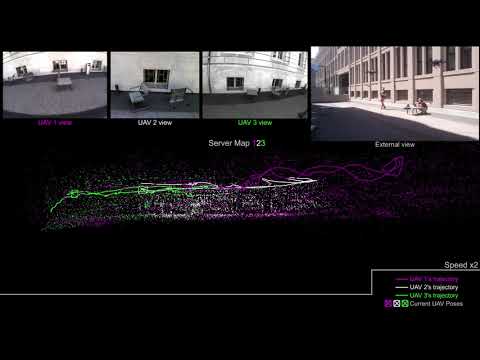
#### Video:
 ## 1.1 Major Modifications
Compared to the implementation described in [2], some modules of this framework experienced major modification in this implementation:
* Global BA (performed when merging two maps or after loop closure) is interrupted as soon as new data from an agent arrives. This speeds up the system, however might affect the accuracy of the estimate during the mission.
# 2. License
CCM-SLAM is released under a [GPLv3 license](https://github.com/VIS4ROB-lab/ccm_slam/blob/master/licencse_gpl.txt). For a list of all code/library dependencies (and associated licenses), please see [Dependencies.md](https://github.com/VIS4ROB-lab/ccm_slam/blob/master/cslam/thirdparty/thirdparty_code.md).
For a closed-source version of CCM-SLAM for commercial purposes, please contact the authors:
pschmuck (at) ethz (dot) ch.
If you use CCM-SLAM in an academic work, please cite:
@inproceedings{schmuck2017multi,
title={Multi-UAV Collaborative Monocular {SLAM}},
author={Schmuck, Patrik and Chli, Margarita},
booktitle={Proceedings of the {IEEE} International Conference on Robotics and Automation ({ICRA})},
year={2017}
}
@inproceedings{schmuck2017ccm,
title={{CCM-SLAM}: Robust and efficient centralized collaborative monocular simultaneous localization and mapping for robotic teams},
author={Schmuck, Patrik and Chli, Margarita},
booktitle={Journal of Field Robotics ({JFR})},
year={2018}
}
# 3. Installation
We have tested CCM-SLAM with **Ubuntu 16.04** (ROS Kinetic with OpenCV 3). It is recommended to use a decently powerful computer for the Server Node to ensure good performance for multi-agent SLAM.
## 3.1 Set up you environment ##
**Note**: change *kinetic* for *indigo* if necessary.
1. Install the build and run dependencies:
```
sudo apt-get install python-catkin-tools
```
2. Create a catkin workspace:
```
mkdir -p ~/ccmslam_ws/src
cd ~/ccmslam_ws
source /opt/ros/kinetic/setup.bash
catkin init
catkin config --extend /opt/ros/kinetic
```
3. Clone the source repo into your catkin workspace src folder:
```
cd ~/ccmslam_ws/src
git clone https://github.com/VIS4ROB-lab/ccm_slam.git
```
## 3.2 Ubuntu 16.04 (ROS Kinetic with OpenCV 3) ##
Compile *DBoW2*:
```
cd ~/ccmslam_ws/src/ccm_slam/cslam/thirdparty/DBoW2/
mkdir build
cd build
cmake ..
make -j8
```
Compile *g2o*:
```
cd ~/ccmslam_ws/src/ccm_slam/cslam/thirdparty/g2o
mkdir build
cd build
cmake --cmake-args -DG2O_U14=0 ..
make -j8
```
Unzip *Vocabulary*:
```
cd ~/ccmslam_ws/src/ccm_slam/cslam/conf
unzip ORBvoc.txt.zip
```
Build the code:
```
cd ~/ccmslam_ws/
catkin build ccmslam --cmake-args -DG2O_U14=0 -DCMAKE_BUILD_TYPE=Release
source ~/ccmslam_ws/devel/setup.bash
```
## 3.3 Ubuntu 14.04 (ROS Indigo with OpenCV 2) ##
Compile *OpenCV*:
```
cd ~/ccmslam_ws/ccm_slam/cslam/thirdparty/
unzip opencv-2.4.13.zip
cd opencv-2.4.13
mkdir build
cd build
cmake ..
make -j8
```
Afterwards, follow the instructions in 3.2.
## 3.4 Known Issues ##
In *g2o*:
Compile-time error ```you_mixed_different_numeric_types```: run ```cmake --cmake-args -DG2O_U14=1 ..``` instead of ```cmake --cmake-args -DG2O_U14=0 ..``` and ```catkin build --cmake-args -DG2O_U14=1``` instead if ```catkin build --cmake-args -DG2O_U14=0```
# 4. Examples
## 4.1 Examples on the EuRoC dataset
* Do not forget to run **source ~/ccmslam_ws/devel/setup.bash** in every terminal zou use for CCM-SLAM
* Download the EuRoC machine hall rosbag datasets from the [website](https://projects.asl.ethz.ch/datasets/doku.php?id=kmavvisualinertialdatasets).
* Start the Server launch file: ```roslaunch ccmslam Server.launch```
* For every agent you want to use, start one launch file, e.g. ```roslaunch ccmslam Client0_euroc.launch```
* Note: If you want to run 4 Agents plus Server simultaneously on one PC, you'll probably need a very powerful machine. Check your CPU load during runtime using e.g. ```htop```. If you are reaching the limits of your machine, run one Agent after the other, or reduce the playback speed of the bagfile using the ```-r``` parameter (e.g. ```rosbag play mybag.bag -r 0.5``` plays the bagfile at half speed).
* Play the rosbag files:
* for Agent 0: ```rosbag play MH_01_easy.bag --start 45```
* for Agent 1: ```rosbag play MH_02_easy.bag --start 35 /cam0/image_raw:=/cam0/image_raw1```
* for Agent 2: ```rosbag play MH_03_medium.bag --start 15 /cam0/image_raw:=/cam0/image_raw2```
* for Agent 3: ```rosbag play MH_04_difficult.bag --start 15 /cam0/image_raw:=/cam0/image_raw3```
* You can change the odometry frames of the Agent and Server maps in the launch files adjusting the values of the ```static_transform_publisher```
* CCM-SLAM provides a config file for RVIZ:
```
roscd ccmslam
rviz -d conf/rviz/ccmslam.rviz
```
The RVIZ window shows in the center the maps known to the server. When two maps are merged, a red line indicates the position of the matching locations in the two maps, and after completion of the merge step, one map is aligned to the other. If no merge takes place, the maps are just overlaid, yet there is no reference between the maps.
The maps of limited size of the agents can also be displayed in RVIZ, however they are hidden by default. By activating ```MarkerCX``` and ```MapPointsCX``` in the RVIZ sidebar, the respective trajectory and map points onboard agent X will be displayed in the background.
You can change the odometry frames of the maps on the server and agent launch files.
## 4.2 KITTI dataset
We provide two launch files for the KITTI odometry [dataset](http://www.cvlibs.net/datasets/kitti/eval_odometry.php). However, CCM-SLAM was only briefly tested with KITTI, and the motion pattern of the car used to capture the data causes problems regarding initialization and drift. For our tests, we converted the KITTI image sequences to ```rosbag``` files.
* ```Client0_kitti.launch``` loads the camera parameters from ```kitti_mono.yaml``` and uses the images from the dataset *as is*
* ```Client0_kitti_half_res.launch``` loads the camera parameters from ```kitti_mono_half_res.yaml``` for images *downsampled by factor 0.5*. In our tests, this alleviated the initialization problems.
## Running CCM-SLAM on multiple PCs
* All PCs need to be in the same network!
* Find the IP address of the PC intented to run the server using ```ifconfig```. Make sure to pick the IP from the wireless interface.
* Start a ```roscore``` on the Server PC.
* On **all** participating PC, in **every** terminal used for CCM-SLAM (no matter whether it is for running camera drivers, bagfiles, a CCM-SLAM launch file or RVIZ), execute: ```export ROS_MASTER_URI=http://IP_OF_SERVER:11311```
# 5. Using your own Data
For using you own datasets or camera, you need to create according calibration and launch files:
* Create a new camera calibration file, e.g. by copying and adjusting ```conf/vi_euroc.yaml```.
* If you don't know the parameters of your camera, you can find them using a camera calibration toolbox, such as [kalibr](https://github.com/ethz-asl/kalibr).
* Create a new launch file, e.g. by copying and adjusting ```launch/EuRoC/Client0_euroc.yaml```.
* Change the parameter ```cam``` to the path of your new camera file.
* Change the parameter ```TopicNameCamSub``` to the name of your camera topic.
* Hint: If you have an existing rosbag-file with camera data, you can directly modify the topic when playing the bagfile: ```rosbag play mybag.bag existing_topic:=new_name```
* There is no need to change ```Server.launch```, however, you can adjust the number of Agents in the system by changing ```NumOfClients```. The maximum is set to **4** in the current implementation.
* If you are using a downward-looking camera instead of a forward-looking (as in the EuRoC sequences), it is recommended to change the rotational part of the [static transform publishers](http://wiki.ros.org/tf#static_transform_publisher) in the launch files to ```0 0 -3.142```, e.g. ``````.
* There should be no need to change the name of the frame-IDs, such as ```odomC0```.
# 6. Parameters
System parameters are loaded from ```conf/config.yaml```. We explain the functionality of the most important parameters in the following lines:
**Mapping**
* ```Mapping.LocalMapSize```: The Local Map of the Agent is limited to n KFs.
* ```Mapping.LocalMapBuffer```: If LocalMapSize can not be reached, e.g. due to communication loss, there is a buffer of n KFs that is filled before KFs are irreversibly removed from the map.
* ```Mapping.RecentKFWindow```: The most recent n KFs of every map are excluded from KF culling.
* ```Mapping.RedThres```: Threshold for KF redundancy. 1.0 means no KF removal. (We recommend to use a value in the range of [1.0,0.95]. Please refer to the publications for details.)
**Communication**
* ```Comm.Client.PubFreq```: The Agent publishes new data from the local map at this frequency.
* ```Comm.Server.PubFreq```: The Server publishes data for the Agents to augment/update their local map at this frequency.
* ```Comm.Server.KfsToClient```: In every message to one Agent, the Server sends the data of the ```n``` closest KFs to the Agent's current position.
* ```Comm.Client.PubMaxKFs```: Maximimum number of KFs per message.
* ```Comm.Client.PubMaxMPs```: Maximimum number of MPs per message.
**Place Recognition**
* ```Placerec.NewLoopThres```: Between two Loop Closures, ```n``` KFs need to pass.
* ```Placerec.StartMapMatchingAfterKf```: Map Matching does not consider the first ```n``` KFs to ensure enough overlap between two map when matching and merging.
**Visualization**
* ```Viewer.Active```: Activate/Deactivate the visualization functionalities.
* ```Viewer.ScaleFactor```: Scales the visualization. Useful since monocular estimates exhibit arbitrary scale.
**Other**
* ```Stats.WriteKFsToFile```: Write KFs to cslam/output. **Attention**: Before being written to the csv-file, KFs are transformed to the body frame of the robot using the transformation given in the camera calibration file by ```T_imu_cam0```.
## 1.1 Major Modifications
Compared to the implementation described in [2], some modules of this framework experienced major modification in this implementation:
* Global BA (performed when merging two maps or after loop closure) is interrupted as soon as new data from an agent arrives. This speeds up the system, however might affect the accuracy of the estimate during the mission.
# 2. License
CCM-SLAM is released under a [GPLv3 license](https://github.com/VIS4ROB-lab/ccm_slam/blob/master/licencse_gpl.txt). For a list of all code/library dependencies (and associated licenses), please see [Dependencies.md](https://github.com/VIS4ROB-lab/ccm_slam/blob/master/cslam/thirdparty/thirdparty_code.md).
For a closed-source version of CCM-SLAM for commercial purposes, please contact the authors:
pschmuck (at) ethz (dot) ch.
If you use CCM-SLAM in an academic work, please cite:
@inproceedings{schmuck2017multi,
title={Multi-UAV Collaborative Monocular {SLAM}},
author={Schmuck, Patrik and Chli, Margarita},
booktitle={Proceedings of the {IEEE} International Conference on Robotics and Automation ({ICRA})},
year={2017}
}
@inproceedings{schmuck2017ccm,
title={{CCM-SLAM}: Robust and efficient centralized collaborative monocular simultaneous localization and mapping for robotic teams},
author={Schmuck, Patrik and Chli, Margarita},
booktitle={Journal of Field Robotics ({JFR})},
year={2018}
}
# 3. Installation
We have tested CCM-SLAM with **Ubuntu 16.04** (ROS Kinetic with OpenCV 3). It is recommended to use a decently powerful computer for the Server Node to ensure good performance for multi-agent SLAM.
## 3.1 Set up you environment ##
**Note**: change *kinetic* for *indigo* if necessary.
1. Install the build and run dependencies:
```
sudo apt-get install python-catkin-tools
```
2. Create a catkin workspace:
```
mkdir -p ~/ccmslam_ws/src
cd ~/ccmslam_ws
source /opt/ros/kinetic/setup.bash
catkin init
catkin config --extend /opt/ros/kinetic
```
3. Clone the source repo into your catkin workspace src folder:
```
cd ~/ccmslam_ws/src
git clone https://github.com/VIS4ROB-lab/ccm_slam.git
```
## 3.2 Ubuntu 16.04 (ROS Kinetic with OpenCV 3) ##
Compile *DBoW2*:
```
cd ~/ccmslam_ws/src/ccm_slam/cslam/thirdparty/DBoW2/
mkdir build
cd build
cmake ..
make -j8
```
Compile *g2o*:
```
cd ~/ccmslam_ws/src/ccm_slam/cslam/thirdparty/g2o
mkdir build
cd build
cmake --cmake-args -DG2O_U14=0 ..
make -j8
```
Unzip *Vocabulary*:
```
cd ~/ccmslam_ws/src/ccm_slam/cslam/conf
unzip ORBvoc.txt.zip
```
Build the code:
```
cd ~/ccmslam_ws/
catkin build ccmslam --cmake-args -DG2O_U14=0 -DCMAKE_BUILD_TYPE=Release
source ~/ccmslam_ws/devel/setup.bash
```
## 3.3 Ubuntu 14.04 (ROS Indigo with OpenCV 2) ##
Compile *OpenCV*:
```
cd ~/ccmslam_ws/ccm_slam/cslam/thirdparty/
unzip opencv-2.4.13.zip
cd opencv-2.4.13
mkdir build
cd build
cmake ..
make -j8
```
Afterwards, follow the instructions in 3.2.
## 3.4 Known Issues ##
In *g2o*:
Compile-time error ```you_mixed_different_numeric_types```: run ```cmake --cmake-args -DG2O_U14=1 ..``` instead of ```cmake --cmake-args -DG2O_U14=0 ..``` and ```catkin build --cmake-args -DG2O_U14=1``` instead if ```catkin build --cmake-args -DG2O_U14=0```
# 4. Examples
## 4.1 Examples on the EuRoC dataset
* Do not forget to run **source ~/ccmslam_ws/devel/setup.bash** in every terminal zou use for CCM-SLAM
* Download the EuRoC machine hall rosbag datasets from the [website](https://projects.asl.ethz.ch/datasets/doku.php?id=kmavvisualinertialdatasets).
* Start the Server launch file: ```roslaunch ccmslam Server.launch```
* For every agent you want to use, start one launch file, e.g. ```roslaunch ccmslam Client0_euroc.launch```
* Note: If you want to run 4 Agents plus Server simultaneously on one PC, you'll probably need a very powerful machine. Check your CPU load during runtime using e.g. ```htop```. If you are reaching the limits of your machine, run one Agent after the other, or reduce the playback speed of the bagfile using the ```-r``` parameter (e.g. ```rosbag play mybag.bag -r 0.5``` plays the bagfile at half speed).
* Play the rosbag files:
* for Agent 0: ```rosbag play MH_01_easy.bag --start 45```
* for Agent 1: ```rosbag play MH_02_easy.bag --start 35 /cam0/image_raw:=/cam0/image_raw1```
* for Agent 2: ```rosbag play MH_03_medium.bag --start 15 /cam0/image_raw:=/cam0/image_raw2```
* for Agent 3: ```rosbag play MH_04_difficult.bag --start 15 /cam0/image_raw:=/cam0/image_raw3```
* You can change the odometry frames of the Agent and Server maps in the launch files adjusting the values of the ```static_transform_publisher```
* CCM-SLAM provides a config file for RVIZ:
```
roscd ccmslam
rviz -d conf/rviz/ccmslam.rviz
```
The RVIZ window shows in the center the maps known to the server. When two maps are merged, a red line indicates the position of the matching locations in the two maps, and after completion of the merge step, one map is aligned to the other. If no merge takes place, the maps are just overlaid, yet there is no reference between the maps.
The maps of limited size of the agents can also be displayed in RVIZ, however they are hidden by default. By activating ```MarkerCX``` and ```MapPointsCX``` in the RVIZ sidebar, the respective trajectory and map points onboard agent X will be displayed in the background.
You can change the odometry frames of the maps on the server and agent launch files.
## 4.2 KITTI dataset
We provide two launch files for the KITTI odometry [dataset](http://www.cvlibs.net/datasets/kitti/eval_odometry.php). However, CCM-SLAM was only briefly tested with KITTI, and the motion pattern of the car used to capture the data causes problems regarding initialization and drift. For our tests, we converted the KITTI image sequences to ```rosbag``` files.
* ```Client0_kitti.launch``` loads the camera parameters from ```kitti_mono.yaml``` and uses the images from the dataset *as is*
* ```Client0_kitti_half_res.launch``` loads the camera parameters from ```kitti_mono_half_res.yaml``` for images *downsampled by factor 0.5*. In our tests, this alleviated the initialization problems.
## Running CCM-SLAM on multiple PCs
* All PCs need to be in the same network!
* Find the IP address of the PC intented to run the server using ```ifconfig```. Make sure to pick the IP from the wireless interface.
* Start a ```roscore``` on the Server PC.
* On **all** participating PC, in **every** terminal used for CCM-SLAM (no matter whether it is for running camera drivers, bagfiles, a CCM-SLAM launch file or RVIZ), execute: ```export ROS_MASTER_URI=http://IP_OF_SERVER:11311```
# 5. Using your own Data
For using you own datasets or camera, you need to create according calibration and launch files:
* Create a new camera calibration file, e.g. by copying and adjusting ```conf/vi_euroc.yaml```.
* If you don't know the parameters of your camera, you can find them using a camera calibration toolbox, such as [kalibr](https://github.com/ethz-asl/kalibr).
* Create a new launch file, e.g. by copying and adjusting ```launch/EuRoC/Client0_euroc.yaml```.
* Change the parameter ```cam``` to the path of your new camera file.
* Change the parameter ```TopicNameCamSub``` to the name of your camera topic.
* Hint: If you have an existing rosbag-file with camera data, you can directly modify the topic when playing the bagfile: ```rosbag play mybag.bag existing_topic:=new_name```
* There is no need to change ```Server.launch```, however, you can adjust the number of Agents in the system by changing ```NumOfClients```. The maximum is set to **4** in the current implementation.
* If you are using a downward-looking camera instead of a forward-looking (as in the EuRoC sequences), it is recommended to change the rotational part of the [static transform publishers](http://wiki.ros.org/tf#static_transform_publisher) in the launch files to ```0 0 -3.142```, e.g. ``````.
* There should be no need to change the name of the frame-IDs, such as ```odomC0```.
# 6. Parameters
System parameters are loaded from ```conf/config.yaml```. We explain the functionality of the most important parameters in the following lines:
**Mapping**
* ```Mapping.LocalMapSize```: The Local Map of the Agent is limited to n KFs.
* ```Mapping.LocalMapBuffer```: If LocalMapSize can not be reached, e.g. due to communication loss, there is a buffer of n KFs that is filled before KFs are irreversibly removed from the map.
* ```Mapping.RecentKFWindow```: The most recent n KFs of every map are excluded from KF culling.
* ```Mapping.RedThres```: Threshold for KF redundancy. 1.0 means no KF removal. (We recommend to use a value in the range of [1.0,0.95]. Please refer to the publications for details.)
**Communication**
* ```Comm.Client.PubFreq```: The Agent publishes new data from the local map at this frequency.
* ```Comm.Server.PubFreq```: The Server publishes data for the Agents to augment/update their local map at this frequency.
* ```Comm.Server.KfsToClient```: In every message to one Agent, the Server sends the data of the ```n``` closest KFs to the Agent's current position.
* ```Comm.Client.PubMaxKFs```: Maximimum number of KFs per message.
* ```Comm.Client.PubMaxMPs```: Maximimum number of MPs per message.
**Place Recognition**
* ```Placerec.NewLoopThres```: Between two Loop Closures, ```n``` KFs need to pass.
* ```Placerec.StartMapMatchingAfterKf```: Map Matching does not consider the first ```n``` KFs to ensure enough overlap between two map when matching and merging.
**Visualization**
* ```Viewer.Active```: Activate/Deactivate the visualization functionalities.
* ```Viewer.ScaleFactor```: Scales the visualization. Useful since monocular estimates exhibit arbitrary scale.
**Other**
* ```Stats.WriteKFsToFile```: Write KFs to cslam/output. **Attention**: Before being written to the csv-file, KFs are transformed to the body frame of the robot using the transformation given in the camera calibration file by ```T_imu_cam0```.