# OpenClawWeChat
**Repository Path**: hillghost86/OpenClawWeChat
## Basic Information
- **Project Name**: OpenClawWeChat
- **Description**: OpenClawWeChat 可通过 ClawChat 的微信小程序实现 OpneClaw 与个人微信之间进行通讯会话。
- **Primary Language**: Unknown
- **License**: Not specified
- **Default Branch**: main
- **Homepage**: None
- **GVP Project**: No
## Statistics
- **Stars**: 1
- **Forks**: 0
- **Created**: 2026-02-07
- **Last Updated**: 2026-03-09
## Categories & Tags
**Categories**: Uncategorized
**Tags**: None
## README
# OpenClawWeChat
[](https://www.npmjs.com/package/openclawwechat)
[](https://www.npmjs.com/package/openclawwechat)
[](LICENSE)
[](https://openclaw.ai)
OpenClawWeChat 可通过 ClawChat 的微信小程序实现 OpenClaw 与个人微信之间进行通讯会话。
众所周知的原因,中国大陆无法使用 Telegram、WhatsApp 等工具与 OpenClaw 会话,虽然可以使用飞书、钉钉,但配置起来也比较复杂。而国民第一大 app 微信,却只支持企业微信,不支持个人微信。
OpenClawWeChat 就是来解决这个用户痛点的!将 OpenClaw 与微信小程序连接,可以直接通过微信小程序与 OpenClaw 进行对话,让 OpenClaw 做你让他做的事情。并且可以随时随地获得 OpenClaw 的回复。
---
## ✨ 功能特性
### 🌟 核心优势
- ✅ **中国大陆唯一可用**的个人微信方案(无需翻墙)
- ✅ **零配置接入**:只需一个 API Key,1 分钟上手
- ✅ **完全免费**:无需订阅,无需付费
- ✅ **支持全类型媒体**:图片、视频、音频、文档全部支持
### 📱 支持的消息类型
- 📝 **文本消息**:支持发送和接收文本消息
- 支持发送斜杠指令
- 📷 **图片**:支持 JPG、PNG、GIF、WebP 等格式
- 🎬 **视频**:支持 MP4、MOV 等视频格式
- 🎵 **语音**:支持语音消息(自动转录为文本)
- 📄 **文档**:支持 PDF、Word、Excel、压缩包等文档格式
- 💬 **消息回复**:支持消息回复功能,上下文清晰
### 🔧 技术特性
- ✅ **Telegram Bot API 兼容**:使用成熟的标准 API
- ✅ **错误处理**:完整的错误处理和日志记录
- ✅ **状态管理**:支持账户状态查询和管理
- ✅ **调试模式**:可启用详细日志便于问题排查
## 🎯 为什么选择 OpenClawWeChat?
| 对比项 | OpenClawWeChat | 企业微信 | 飞书/钉钉 | iPad 协议方案 |
|--------|---------------|---------|----------|-------------|
| **个人可用** | ✅ | ❌ | ✅ | ✅ |
| **配置难度** | ⭐ 极简 | ⭐⭐ 中等 | ⭐⭐⭐ 复杂 | ⭐⭐⭐⭐ 很复杂 |
| **无需翻墙** | ✅ | ❌ | ❌ | ❌ |
| **媒体支持** | ✅ 全类型 | ⚠️ 有限 | ✅ | ✅ |
| **稳定性** | ⭐⭐⭐⭐ 高 | ⭐⭐⭐⭐⭐ 很高 | ⭐⭐⭐⭐ 高 | ⭐⭐ 中等 |
| **免费使用** | ✅ | ❌ | ❌ | ❌ |
| **推荐场景** | 个人用户 | 团队协作 | 团队协作 | 技术玩家 |
## 💡 使用场景
### 📚 学习辅助
- 随时随地问 AI 问题,获得答案
- 翻译英文文档、解释专业术语
- 生成代码示例、调试错误
### 💼 工作效率
- 快速撰写邮件、报告
- 总结会议纪要
- 脑暴创意、优化方案
### 🎮 生活娱乐
- 获取旅游攻略
- 推荐电影、书籍
- 规划健身计划
### 🛠️ 技术开发
- 调试代码、查找错误
- 学习新技术
- 生成配置文件
## ⚡ 快速开始(3分钟搞定)
### 1️⃣ 获取 API Key
打开微信 → 搜索小程序 **ClawChat** → 我的页面 → APIKey管理 → 复制 API Key
### 2️⃣ 安装插件
```bash
openclaw plugins install openclawwechat
```
### 3️⃣ 配置并启动
```bash
cd ~/.openclaw/extensions/openclawwechat
npm run config-init # 输入你的 API Key
openclaw gateway restart
```
### 4️⃣ 多 API Key 账户配置(可选)
如果你需要接入第二个及以上 API Key,再次运行配置脚本:
```bash
cd ~/.openclaw/extensions/openclawwechat
npm run config-init
```
在菜单中选择:
- `2) 新增 ApiKey`:添加新的账户
- `3) 删除 ApiKey`:删除非 `default` 账户
> 首次安装或升级迁移建议先选 `1) 初始化/更新 ApiKey` 完成 `default` 账户配置。
✅ 完成!打开 ClawChat 小程序即可开始对话。
> 📖 **详细配置说明请查看下方的"安装与配置"章节**
## 📸 使用截图


## 📋 前置要求
- OpenClaw Gateway 已安装并运行
- 安装见 [openclaw 官网 https://openclaw.ai](https://openclaw.ai) | [github@openclaw](https://github.com/openclaw)
- 有效的 API Key(格式:`bot_id:secret`)
- 💡 **获取方式:** 打开微信,搜索小程序 **ClawChat**,在我的页面 APIKey管理 复制你的 API Key
## 📦 详细安装与配置
### 安装方式
#### 方法一:从 NPM 自动安装(推荐)
```bash
# 安装最新版本
openclaw plugins install openclawwechat
```
#### 方法二:从 GitHub 手动安装
如果需要最新开发版本或遇到 NPM 安装问题,可以从 GitHub 安装:
**macOS / Linux:**
```bash
cd ~/.openclaw/extensions
git clone https://github.com/hillghost86/OpenClawWeChat.git
cd OpenClawWeChat
```
**Windows:**
```powershell
# PowerShell
cd $env:USERPROFILE\.openclaw\extensions
git clone https://github.com/hillghost86/OpenClawWeChat.git
cd OpenClawWeChat
```
```cmd
# CMD
cd %USERPROFILE%\.openclaw\extensions
git clone https://github.com/hillghost86/OpenClawWeChat.git
cd OpenClawWeChat
```
---
## ⚙️ 配置插件
### 配置方式
#### 方法一:使用配置脚本(推荐)
**macOS / Linux:**
```bash
cd ~/.openclaw/extensions/openclawwechat
npm run config-init
```
**Windows PowerShell:**
```powershell
cd $env:USERPROFILE%\.openclaw\extensions\openclawwechat
npm run config-init
```
**Windows CMD:**
```cmd
cd %USERPROFILE%\.openclaw\extensions\openclawwechat
npm run config-init
```
#### 方法二:手动配置
**配置文件位置:**
- **macOS / Linux:** `~/.openclaw/openclaw.json`
- **Windows:** `%USERPROFILE%\.openclaw\openclaw.json` 或 `C:\Users\<用户名>\.openclaw\openclaw.json`
**最小配置(推荐):**
```json
{
"plugins": {
"entries": {
"openclawwechat": {
"enabled": true,
"config": {
"accounts": {
"default": {
"apiKey": "your_bot_id:your_secret"
}
}
}
}
}
}
}
```
> 💡 **提示:**
> - API Key 可从**微信小程序 ClawChat** 中获取(我的页面 → APIKey管理)
> - 只配置需要自定义的项,使用默认值的配置**不需要写入**配置文件
> - OpenClaw 会自动从插件清单中读取默认值
> - 配置脚本支持 `1) 初始化/更新 ApiKey 2) 新增 ApiKey 3) 删除 ApiKey`
---
## ⚙️ 配置说明
### 配置项(推荐结构)
| 配置项 | 类型 | 必需 | 默认值 | 说明 |
|--------|------|------|--------|------|
| `config.accounts.default.apiKey` | string | ✅ | - | 默认账户 API Key(格式:`bot_id:secret`) |
| `config.accounts..apiKey` | string | 多账户时 ✅ | - | 非 default 账户 API Key |
| `config.accounts..sessionKey` | string | 非 default 账户 ✅ | - | 格式:`agent::`,且唯一 |
| `config.defaults.pollIntervalMs` | number | ❌ | `5000` | 默认轮询间隔(毫秒) |
| `config.defaults.debug` | boolean | ❌ | `false` | 默认是否启用调试日志 |
### 配置示例
#### 最小配置(单账户)
> 💡 **获取 API Key:** 打开微信小程序 ClawChat,在设置或账户页面可以找到你的 API Key。
```json
{
"accounts": {
"default": {
"apiKey": "20231227:EXAMPLE_SECRET_KEY_35_CHARS_LONG_12345"
}
}
}
```
#### 完整配置(多账户)
```json
{
"defaults": {
"pollIntervalMs": 5000,
"debug": false
},
"accounts": {
"default": {
"apiKey": "20231227:EXAMPLE_SECRET_KEY_35_CHARS_LONG_12345"
},
"bot2": {
"apiKey": "20231228:EXAMPLE_SECRET_KEY_35_CHARS_LONG_67890",
"sessionKey": "agent:main:wechat:bot2"
}
}
}
```
---
## ✅ 验证安装
### 重启 Gateway
```bash
openclaw gateway restart
```
### 验证安装
```bash
# 查看插件状态
openclaw plugins list
# 查看日志
openclaw logs --follow | grep "openclawwechat"
```
进入 ClawChat 微信小程序,查看小程序会话界面是否已链接 OpenClaw。
---
## 🆙 升级插件
### 自动升级(推荐)
如果插件是通过 `openclaw plugins install` 安装的,并且配置脚本已创建了安装记录,可以使用以下命令升级:
```bash
# 升级到最新版本
openclaw plugins update openclawwechat
# 查看升级结果
openclaw plugins list | grep openclawwechat
```
> 💡 **提示:**
> - 如果提示 "No install record",说明配置文件中没有安装记录,请使用方法二
> - 如果运行 `config-init.js` 配置脚本,会自动创建安装记录,之后就可以使用此方法升级
### 手动升级
点击展开手动升级步骤
插件版本 1.0.9 以前的版本,使用手动升级方法。如果配置文件中没有安装记录,可以删除旧版本后重新安装:
```bash
# 1. 删除旧版本
rm -rf ~/.openclaw/extensions/openclawwechat
# 2. 重新安装最新版本
openclaw plugins install openclawwechat
# 3. 运行配置脚本(如果配置已存在,可以选择不更新)
cd ~/.openclaw/extensions/openclawwechat
npm run config-init
```
### 从 GitHub 手动升级
如果是从 GitHub 克隆安装的:
```bash
# 进入插件目录
cd ~/.openclaw/extensions/openclawwechat
# 拉取最新代码
git pull
# 更新配置文件
npm run config-init
# 重启 Gateway
openclaw gateway restart
```
### 升级后验证
升级完成后,建议验证插件是否正常工作:
```bash
# 1. 查看插件版本
openclaw plugins list | grep openclawwechat
# 2. 在微信小程序 ClawChat 中测试消息发送
```
---
## 🗑️ 卸载插件
### 自动卸载(推荐)
**Mac/Linux**
```bash
# 方法 1:使用 npm 脚本(推荐,会删除配置和插件目录)
cd ~/.openclaw/extensions/openclawwechat
npm run uninstall
# 或使用node卸载
node ~/.openclaw/extensions/openclawwechat/scripts/uninstall.js
```
**Windows:**
PowerShell 方法:
```powershell
# PowerShell
cd $env:USERPROFILE\.openclaw\extensions\openclawwechat
npm run uninstall
# 或使用node运行配置脚本
node $env:USERPROFILE%\.openclaw\extensions\openclawwechat/scripts/uninstall.js
```
CMD 方法:
```cmd
# CMD
cd %USERPROFILE%\.openclaw\extensions\openclawwechat
npm run uninstall
# 或使用node运行配置脚本
node %USERPROFILE%\.openclaw\extensions\openclawwechat/scripts/uninstall.js
```
卸载脚本会:
1. 从配置文件中删除插件配置
2. 从配置文件中删除插件安装记录(如果存在)
3. 删除插件目录(`~/.openclaw/extensions/openclawwechat`)
### 手动卸载
点击展开手动卸载步骤
如果无法运行卸载脚本,可以手动删除:
```bash
# 1. 删除插件目录
rm -rf ~/.openclaw/extensions/openclawwechat
# 2. 编辑配置文件,删除插件配置
# 编辑 ~/.openclaw/openclaw.json,删除 plugins.entries.openclawwechat 项
# 3. 重启 Gateway
openclaw gateway restart
```
---
## ❓ FAQ 常见问题
### Q1: 需要翻墙吗?
**A:** 不需要!通过微信小程序在国内可直接使用。
### Q2: 消息会被记录吗?
**A:** 消息会通过中转服务器传输,但不存储聊天内容。中转服务器仅负责消息转发。
### Q3: 支持多用户吗?
**A:** 每个微信用户有独立的对话上下文,互不干扰。
### Q4: 免费吗?有使用限制吗?
**A:** 完全免费,没有使用次数限制。但请注意遵守 OpenClaw 的 API 配额。
### Q5: 如何更新插件?
**A:** 运行 `openclaw plugins update openclawwechat` 即可更新到最新版本。
### Q6: 消息延迟大吗?
**A:** 正常情况下延迟在 2-5 秒内,取决于网络状况。默认轮询间隔为 2 秒。
### Q7: 支持哪些 OpenClaw 功能?
**A:** 支持基本的文本对话、媒体文件处理、斜杠指令等。
### Q8: 小程序搜索不到怎么办?
**A:** 尝试:
1. 更新微信到最新版本
2. 在微信中搜索"ClawChat"
---
## 🔧 核心实现
点击展开技术实现细节
### 1. 插件入口 (index.ts)
```typescript
import type { OpenClawPluginApi } from "openclaw/plugin-sdk";
import { wechatMiniprogramPlugin } from "./src/channel.js";
import { setWechatMiniprogramRuntime } from "./src/runtime.js";
import { PLUGIN_ID, PLUGIN_VERSION } from "./src/constants.js";
const plugin = {
id: PLUGIN_ID,
name: "OpenClawWeChat",
description: "OpenClawWeChat - WeChat MiniProgram channel plugin for OpenClaw",
version: PLUGIN_VERSION,
configSchema: {
type: "object",
properties: {
config: { type: "object" },
defaults: { type: "object" },
accounts: { type: "object" }
}
},
register(api: OpenClawPluginApi) {
setWechatMiniprogramRuntime(api.runtime);
api.registerChannel({ plugin: wechatMiniprogramPlugin });
},
};
export default plugin;
```
### 2. Channel Plugin (src/channel.ts)
实现 `ChannelPlugin` 接口,包括:
- `config` - 配置管理和验证
- `inbound` - 接收消息处理
- `outbound` - 发送消息(支持文本和媒体)
- `status` - 账户状态查询
- `gateway` - Gateway 生命周期管理
### 3. Runtime 管理 (src/runtime.ts)
```typescript
import type { PluginRuntime } from "openclaw/plugin-sdk";
let runtime: PluginRuntime | null = null;
export function setWechatMiniprogramRuntime(next: PluginRuntime) {
runtime = next;
}
export function getWechatMiniprogramRuntime(): PluginRuntime {
if (!runtime) {
throw new Error("WeChat MiniProgram runtime not initialized");
}
return runtime;
}
```
---
## ❓ 故障排查
### 常见问题
1. **插件未加载**
- 检查插件是否已启用:`openclaw plugins list`
- 检查配置文件格式是否正确
- 查看日志:`openclaw logs | grep "openclawwechat"`
2. **消息发送失败**
- 检查 API Key 是否正确
- 检查网络连接
3. **轮询未工作**
- 检查 `config.defaults.pollIntervalMs` 配置,默认是 5000ms
- 查看轮询服务日志
### 调试模式
启用调试日志:
```json
{
"config": {
"defaults": {
"debug": true
},
"accounts": {
"default": {
"apiKey": "your_api_key"
}
}
}
}
```
---
## 📖 相关文档
- [更新日志](./CHANGELOG.md)
- [详细配置说明](./CONFIG.md)
- [OpenClaw 插件开发指南](https://docs.openclaw.ai/plugins)
---
## 🤝 支持与反馈
### 💬 获取帮助
- 📖 [详细文档](./CONFIG.md)
- 🐛 [提交问题](https://github.com/hillghost86/OpenClawWeChat/issues)
- 💬 [OpenClaw 社区](https://discord.gg/clawd)
### 📮 联系方式
- **作者:** hillghost86
- **GitHub:** [hillghost86/OpenClawWeChat](https://github.com/hillghost86/OpenClawWeChat)
- **问题反馈:** [GitHub Issues](https://github.com/hillghost86/OpenClawWeChat/issues)
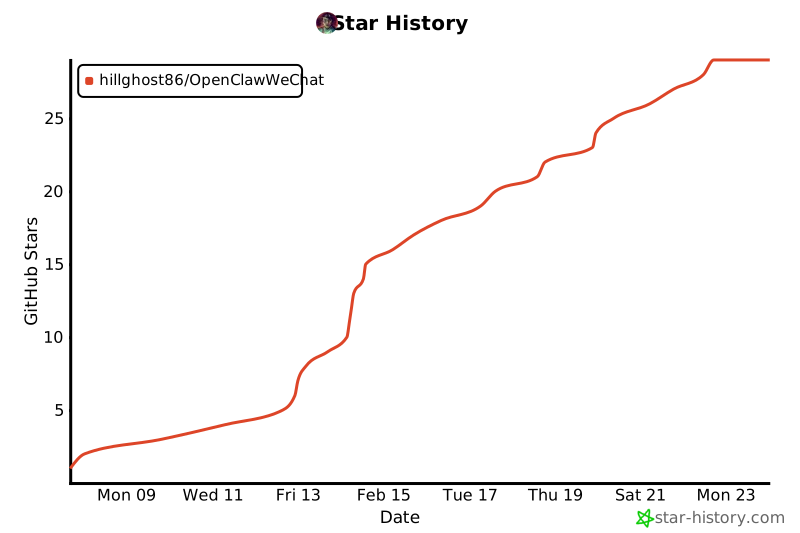
## Star History
[](https://www.star-history.com/#hillghost86/OpenClawWeChat&type=date&legend=top-left)
### ⭐ 如果这个插件对你有帮助
- 给个 ⭐ Star,让更多人看到!
- 分享给你的朋友,一起用起来
- 提交 Issue 或 PR,帮助项目改进
---
## 🤝 贡献
欢迎提交 Issue 和 Pull Request!
### 贡献方式
1. Fork 本仓库
2. 创建特性分支 (`git checkout -b feature/AmazingFeature`)
3. 提交更改 (`git commit -m 'Add some AmazingFeature'`)
4. 推送到分支 (`git push origin feature/AmazingFeature`)
5. 开启 Pull Request
---
## 🙏 致谢
- [OpenClaw](https://openclaw.ai) - 提供强大的 AI 助手平台
- [ClawChat](https://github.com/xxx) - 提供微信小程序中转服务
- 所有贡献者和使用者
---
## 📄 许可证
本项目采用 MIT 许可证 - 详见 [LICENSE](LICENSE) 文件